Al Shield:
Active

Take Control of Your Sending. Own Your Email Infrastructure.
Legacy providers mix your emails with spammers. We provide isolated, AI-protected servers with dedicated IPs for your Sales, Marketing, Financial, and Transactional traffic—so your messages land in the inbox, not the spam folder.
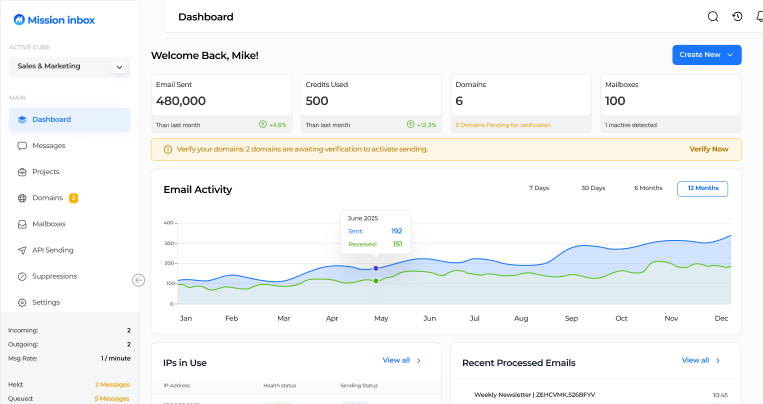
Mission inbox dashboard showing email statistics including 480,000 emails sent, 500 credits used, 6 domains with 2 pending verification, 100 mailboxes with 1 inactive, an email activity graph from Jan to Dec, and a sidebar menu for navigation.Mission Inbox dashboard showing email stats: 480,000 emails sent, 500 credits used, 6 domains with 2 pending verification, 100 mailboxes with 1 inactive, and a 12-month email activity graph.
Mission Inbox deliverability is now neck & neck with G-suite and microsoft infra, and in our case, 2x better.
-  Ali Syed
Deliverability used to be my #1 problem. Now, it's like 2009-2012 again; just bogged down with unlimited leads and meetings.
- Dmitriy Katsel
Partners

Powering the next generation of outbound.

Trusted by Y Combinator startups and Enterprises sending 50M+ emails per month.
The Solution

The Old Ways Are
Putting Your Business at Risk.

You're forced to choose between contamination or instability.
There is a third way.
The Legacy Giants
SendGrid, Mailgun, Resend
Contamination
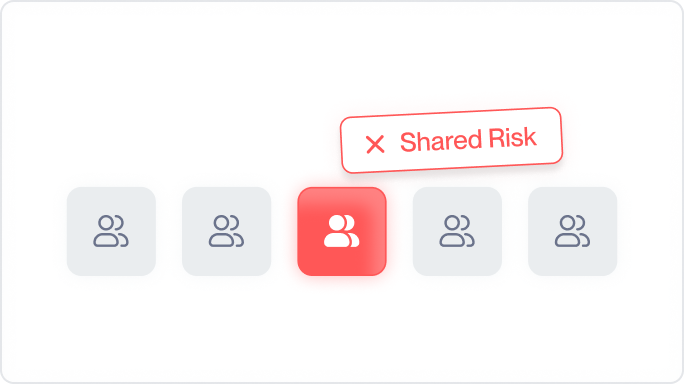
Shared IP Pools mean one spammer ruins reputation for everyone.
Five user icons in a row with the middle icon highlighted in red and labeled 'Shared Risk' with a red X.Icon row with five user group icons, the middle one highlighted in red with a tooltip labeled 'Shared Risk'.
The Cheap Resellers
Mailreef, Scaledmail, Wrappers
Business Failure
Just wrappers reselling Google. If they disappear, your business halts.
Diagram showing a wrapper layer in orange between content analysis and Google/Microsoft layers with an alert icon.Diagram showing a highlighted Wrapper Layer in orange over a box labeled Content Analysis and Google/Microsoft, with an alert icon.
Mission Inbox
The New Standard
The Solution
You get Isolated Cubes and Dedicated IPs. You own the infrastructure, the reputation, and the data.
Three colored squares labeled Sales, Marketing, and Financial with upward trend arrows and green check marks, above icons and text stating Isolated, Dedicated IPs, and Full Ownership.Diagram showing three sections labeled Sales, Marketing, and Financial with upward trending arrows and indicators for Isolated, Dedicated IPs, and Full Ownership.
Deep Infrastructure

One Infrastructure. Dedicated Lanes.

We isolate your traffic by workload, ensuring a marketing blast never blocks a CEO's invoice.
Sales & Marketing
Scale without the spam folder.
High-volume capabilities with Al-enforced protection to land in the Primary tab.
get started
Graph with a blue line trending upward, highlighting 89% growth and $10,000/month for each active member.
Transactional
Delivery in milliseconds.
Isolated lanes for OTPs and user alerts. Zero queueing behind marketing blasts.
get started
User interface showing three options with lightning bolt icons: 'Add Funds' and 'Easy Add-On' with cancel buttons, and highlighted 'Recharge Now' with a blue buy button.
Financial & Legal
Audit-ready security.
Immutable logs and residency routing for Invoices, Statements, and Compliance notices.
get started
Three blue app icons each labeled Invoice #12345, Compliance #24680, and Statement #67890 with text 'Immutable Log · Encrypted' and green 'Logged' status boxes.
Platforms (For Developers)
Build your own email product.
White-label our OBM Engine™ to power email features inside your SaaS.
get started
Diagram showing a central API icon connected to six programming languages: Node.js, Python, Ruby, PHP, Go, and Java, with indicators for White-Label Ready and Full API Access below.
features

Engineered for the Modern Inbox.

Code snippet for sending an email using MissionInbox API with isolated infrastructure, specifying sender, receiver, subject, and HTML template.
Partners

API or SMTP Architecture.

Built for developers. <50ms latency, webhooks, and granular analytics that integrate directly into your stack.
<50ms average latency
99.9%
RESTful API with SDKs
6 languages
Real-time webhooks
Instant
The Cubes

Workload-Specific Isolation.

We don't just give you an IP; we give you a dedicated server instance. Plug-and-play SMTP or API integration that scales from 10k to 30M sends.
IOk-30M
Sends/Month
100%
Isolated
<5min
Setup
Four network service cards labeled Sales & Outreach, Marketing Campaigns, Transactional, and Financial & Invoices, each showing IP 192.168.1.10 with status active and dedicated IP isolated infrastructure.
Security check interface showing passed steps: Content Analysis, Header Validation, DNS Check, and Spam Detection, each with 12 ms timing and a final button labeled All Checks Passed - Ready To Send.
MI Shield™

AI-Enforced Protection.

A proprietary firewall that scans content, headers, and DNS before the email leaves. If it looks like spam, we block it—saving your domain from burning.
Real-time content analysis
Spam pattern detection
Anomaly-based threat detection
Header & DNS validation
Compare

Stop Compromising.

See why modern teams are migrating from legacy providers.
Cold Email Friendly
Mailbox Provisioning
pre-send Quality Check
Deliverability Insights
Warm-Up Support
API Access
Dedicated Infrastructure
SendGrid
Solid red circle on a white background.
Solid bright green circle on a black background.
Mailgun
Solid red circle on a white background.
Solid bright green circle on a black background.
Google Workspace
Solid red circle on a white background.
Solid bright green circle on a black background.
Solid red circle on a white background.
Solid bright green circle on a black background.
Resellers
Solid bright green circle on a black background.
Solid red circle on a white background.
Solid bright green circle on a black background.
Green checkmark inside a circle indicating confirmation or success.
Cold Email Friendly
Green checkmark inside a circle indicating confirmation or success.
Mailbox Provisioning
Green checkmark inside a circle indicating confirmation or success.
pre-send Quality Check
Green checkmark inside a circle indicating confirmation or success.
Deliverability Insights
Green checkmark inside a circle indicating confirmation or success.
Warm-Up Support
Green checkmark inside a circle indicating confirmation or success.
API Access
Green checkmark inside a circle indicating confirmation or success.
Dedicated Infrastructure
Start Sending
SendGrid
Solid red circle on a white background.
Cold Email Friendly
Solid red circle on a white background.
Mailbox Provisioning
Solid red circle on a white background.
pre-send Quality Check
Solid red circle on a white background.
Deliverability Insights
Solid red circle on a white background.
Warm-Up Support
Solid bright green circle on a black background.
API Access
Solid bright green circle on a black background.
Dedicated Infrastructure
Mailgun
Solid red circle on a white background.
Cold Email Friendly
Solid red circle on a white background.
Mailbox Provisioning
Solid red circle on a white background.
pre-send Quality Check
Solid red circle on a white background.
Deliverability Insights
Solid red circle on a white background.
Warm-Up Support
Solid bright green circle on a black background.
API Access
Solid bright green circle on a black background.
Dedicated Infrastructure
Google Workspace
Solid red circle on a white background.
Cold Email Friendly
Solid bright green circle on a black background.
Mailbox Provisioning
Solid bright green circle on a black background.
pre-send Quality Check
Solid red circle on a white background.
Deliverability Insights
Solid red circle on a white background.
Warm-Up Support
Solid red circle on a white background.
API Access
Solid bright green circle on a black background.
Dedicated Infrastructure
Resellers
Solid bright green circle on a black background.
Cold Email Friendly
Solid red circle on a white background.
Mailbox Provisioning
Solid red circle on a white background.
pre-send Quality Check
Solid red circle on a white background.
Deliverability Insights
Solid red circle on a white background.
Warm-Up Support
Solid bright green circle on a black background.
API Access
Solid bright green circle on a black background.
Dedicated Infrastructure
get started

Your Infrastructure is Ready.

Stop gambling with shared IPs. Join the private email cloud.
Deploy Infrastructure
How is Mission Inbox different from traditional email services like SendGrid, Mailgun, or Resend?

Traditional email services are primarily designed for transactional email (e.g., receipts, password resets) and may block, limit, or suspend accounts that handle other email workloads. Mission Inbox is built from the ground up as an all-in-one workload Infrastructure-as-a-Service (IaaS) platform.
It is specifically engineered for deliverability across all email types, providing the protection and control needed to send responsibly at scale without compromising performance or compliance.

What are the three core technologies that ensure high deliverability?

Mission Inbox operates on three distinct layers that work together to maximize inbox placement:

1. Inbox Layer: For fast setup, it allows you to create or bring your own SMTP accounts or API, and features Auto-push DNS (for SPF, DKIM, and DMARC) with providers like Cloudflare and GoDaddy.

2. Pre-send Shield™: An AI-powered firewall that scans every outgoing email to prevent poor structure, lack of personalization, bad DNS, and spam triggers before the message leaves your system.

3. OBM Engine (Outboxment): This is the sending server portion that offers complete reputation control, detailed logs, bounce handling, feedback loops, and deliverability analytics.

Who is Mission Inbox built for, and what volume can it handle?

The infrastructure is designed to be highly scalable, supporting operations that range from 10,000 up to 30 million sends per month without interruption.

Do I need to be technical to set up my domain authentication?

No. Mission Inbox simplifies the most complex part of email deliverability. While proper setup is vital (SPF, DKIM, DMARC), the platform handles the technical heavy lifting by allowing you to automatically push the correct DNS records to major providers like Cloudflare and GoDaddy, ensuring your domains are properly authenticated in seconds.

What is the starting price, and what does the primary plan include?

The starting plan for the All-in-One MI begins at $199/month. This typically includes:
· 30 inboxes
· 10,000 sends
· 20 credits
You can scale as you grow. Overusage is managed transparently with additional costs per thousand sends (e.g., $1 per thousand) and per extra mailbox (e.g., $2–$3 per mailbox).

Do I get Shared IPs or Dedicated IP?

You get between 2 or 3 dedicated IPs depending on volume.

pricing

Flexible Pricing

Built to Grow With You

Start at $199/month and grow at your own pace. Add inboxes and increase sending volume easily, making Mission Inbox perfect for teams, agencies, or individuals scaling their cold email campaigns.
Get Started
Starting Price
$199/month
Most Popular
Add inboxes and scale sending easily for teams or individuals, anytime and without limits.
What's Included:
30 inboxes included
10,000 sends
20 credits
What's Included:
$1 per additional 1,000 sends
$2–$3 per additional mailbox