The Complete Guide to SMTP Relay Services: Reliability, Setup, and Security
Understanding the role of an SMTP relay service is fundamental to mastering high-volume, reliable email delivery for any modern business. This guide establishes exactly what these services are, positioning them as the essential postal service managing your outbound messages, which is why you rely on them to offload the complexity and overhead of maintaining your own sending infrastructure.
You will gain a clear view of how a dedicated relay surpasses a standard server, learn the tangible benefits it provides for bypassing ISP restrictions and safeguarding your sender reputation, and trace the technical journey of an email transaction from authentication to final receipt. Furthermore, we will evaluate the critical tradeoffs between utilizing shared public resources and investing in private infrastructure, providing the necessary instructions to configure your chosen service securely, including necessary steps for platforms like Microsoft 365 and Google Workspace. Finally, you will see how to verify your setup and leverage AI defenses against evolving security threats to ensure your communications always reach the inbox.
Ready to Fix Your Deliverability?
Better infrastructure means higher reply rates, and more revenue from the same campaigns.
An SMTP relay service is a specialized third-party infrastructure designed to transmit emails on behalf of a business or application. It functions as a trusted intermediary that takes the messages you send and manages the complex technical process of routing them across the internet to the recipient's mail server.
For high-growth organizations, this service is essential for overcoming the strict sending limitations and reputation hurdles associated with standard webmail providers. By utilizing an SMTP relay, businesses can ensure that high-volume messages—such as password resets, order confirmations, and marketing newsletters—bypass common delivery roadblocks to reach the inbox successfully.
The Basics of SMTP Relaying
SMTP (Simple Mail Transfer Protocol) provides the standardized framework for moving electronic mail across different networks. The foundational technical specifications for this protocol are outlined in RFC 5321, which establishes the "handshake" and communication rules that servers must follow to exchange data.
In modern email communication, relaying serves as the backbone of global connectivity. Rather than forcing a sender to maintain their own complex mail transfer agent (MTA) and deal with IP warming or hardware maintenance, a relay service provides a pre-configured environment. This infrastructure is specifically optimized for deliverability and speed, ensuring that emails are not only sent but are accepted by major ISPs and mailbox providers.
SMTP Relay vs. SMTP Server: Understanding the Differences
While the terms are often used interchangeably, understanding the distinction between a standard SMTP server and a smtp relay service is critical for maintaining a healthy sending reputation. A standard SMTP server is typically your "local" mail server (like Gmail or Outlook) used for personal correspondence, whereas a relay acts as a sophisticated transit hub designed for high-volume or automated mail.
Key differences include:
Storage vs. Transit: Standard servers are designed for both sending and storing mail (inboxes). Relays focus almost exclusively on fast, reliable transit between servers.
Volume Thresholds: Standard providers impose strict daily sending limits (often 500–2,000 emails) to prevent spam. A dedicated relay service is built to handle millions of messages without throttling.
Authentication Flexibility: Relays allow for more complex SPF, DKIM, and DMARC configurations, which are essential when sending on behalf of multiple domains or subdomains.
Infrastructure Ownership: A standard server uses shared resources, while a private relay often provides a dedicated server instance for complete environmental control.
SMTP Relay Tables — Mission Inbox
SMTP Server Types: Which Is Right for You?
Feature
Standard SMTP Server
Public Relay
Private SMTP Relay
IP Status
Shared / Dynamic
Shared Pool
Dedicated IP
Isolation
✗ None. Shared with all users.
⚠ Low. Subject to noisy neighbors.
✓ High. Total reputation isolation.
Reputation Control
✗ Provider-defined limits only.
⚠ Basic. Shared with pool users.
✓ Full. Only your sending affects your score.
Sending Volume
500 to 2,000 per day max
Moderate. Pool limits apply.
Millions. Built for scale.
Authentication
Basic SPF only
SPF and DKIM supported
✓ Full SPF, DKIM, DMARC control
Infrastructure
Shared resources
Shared servers
✓ Dedicated server instance
Best For
One-to-one communication
Low-volume notifications
High-volume cold email outreach
Bad Neighbor Risk
⚠ High — shared with everyone
⚠ High — shared pool
✓ None — fully isolated
Mission Inbox provides dedicated private SMTP relay with isolated infrastructure on every plan. No shared pools. No noisy neighbors.
Why Dedicated Services Outperform Standard Servers
For businesses scaling their outreach, relying on a standard SMTP server is a recipe for deliverability failure. Standard servers lack the specialized infrastructure needed to navigate modern spam filters, which look for high-volume signals coming from shared IP addresses.
A dedicated smtp relay service provides a clean, isolated environment. By utilizing a dedicated IP, you ensure that your reputation is yours alone—no other sender can cause your emails to be blacklisted. This architectural isolation is the primary driver behind superior deliverability rates. When your infrastructure is optimized and your IP is warmed correctly, you move past the "promotions" tab and land directly in the primary inbox, maximizing the ROI of every campaign.
Why Businesses Use SMTP Relay Services for High-Volume Sending
Standard email clients like Gmail or Outlook are designed for one-to-one communication. When a business attempts to scale, these platforms quickly become a bottleneck. Using a dedicated SMTP relay service allows organizations to offload the heavy lifting of email delivery to an infrastructure specifically engineered for volume and speed.
Bypassing ISP Constraints
Consumer Internet Service Providers (ISPs) and standard webmail providers impose strict limits to prevent their networks from being used for spam. If you try to send a marketing blast or a high volume of transactional alerts through a standard account, you will likely hit a "rate limit" or face account suspension.
Typical constraints for non-relay sending include:
Gmail (Personal): Limited to 500 recipients per day.
Outlook.com: Typically capped at 300 recipients per day and limited to 30 messages per minute.
Consumer ISPs (e.g., Comcast, AT&T): Often limit users to 1,000 emails per day or as few as 100 emails per hour, frequently blocking Port 25 entirely to restrict outbound mail.
An SMTP relay service bypasses these local restrictions by routing your traffic through professional-grade servers that have established relationships with receiving mail servers (like Yahoo or iCloud), ensuring your high-volume traffic is welcomed rather than throttled.
Protecting Sender Reputation
Your sender reputation is a score assigned by receiving ISPs based on your sending history, bounce rates, and spam complaints. If you send mass emails from your primary corporate domain or a shared office IP, a single "spam" report from a recipient can blacklist your entire office, causing your critical person-to-person business emails to fail.
By utilizing a relay, you can isolate different types of traffic. For example, dedicated SMTP mailboxes allow you to separate marketing campaigns from transactional receipts, ensuring that a surge in one area doesn't negatively impact the deliverability of the other.
Core Advantages of a Dedicated Relay
Transitioning to a professional SMTP relay provides several strategic advantages for growing businesses:
Scale email operations instantly without upgrading internal hardware or physical infrastructure.
Ensure high deliverability rates by utilizing dedicated IP addresses that are "warmed up" and monitored for health.
Access granular analytics, including real-time data on opens, clicks, bounces, and unsubscribes.
Automate mission-critical communications like password resets, shipping notifications, and multi-factor authentication (MFA) codes.
Secure all outbound transmissions using TLS encryption, protecting sensitive user data from interception.
Optimize inbox placement using AI-powered tools that adjust sending patterns based on recipient ISP behavior.
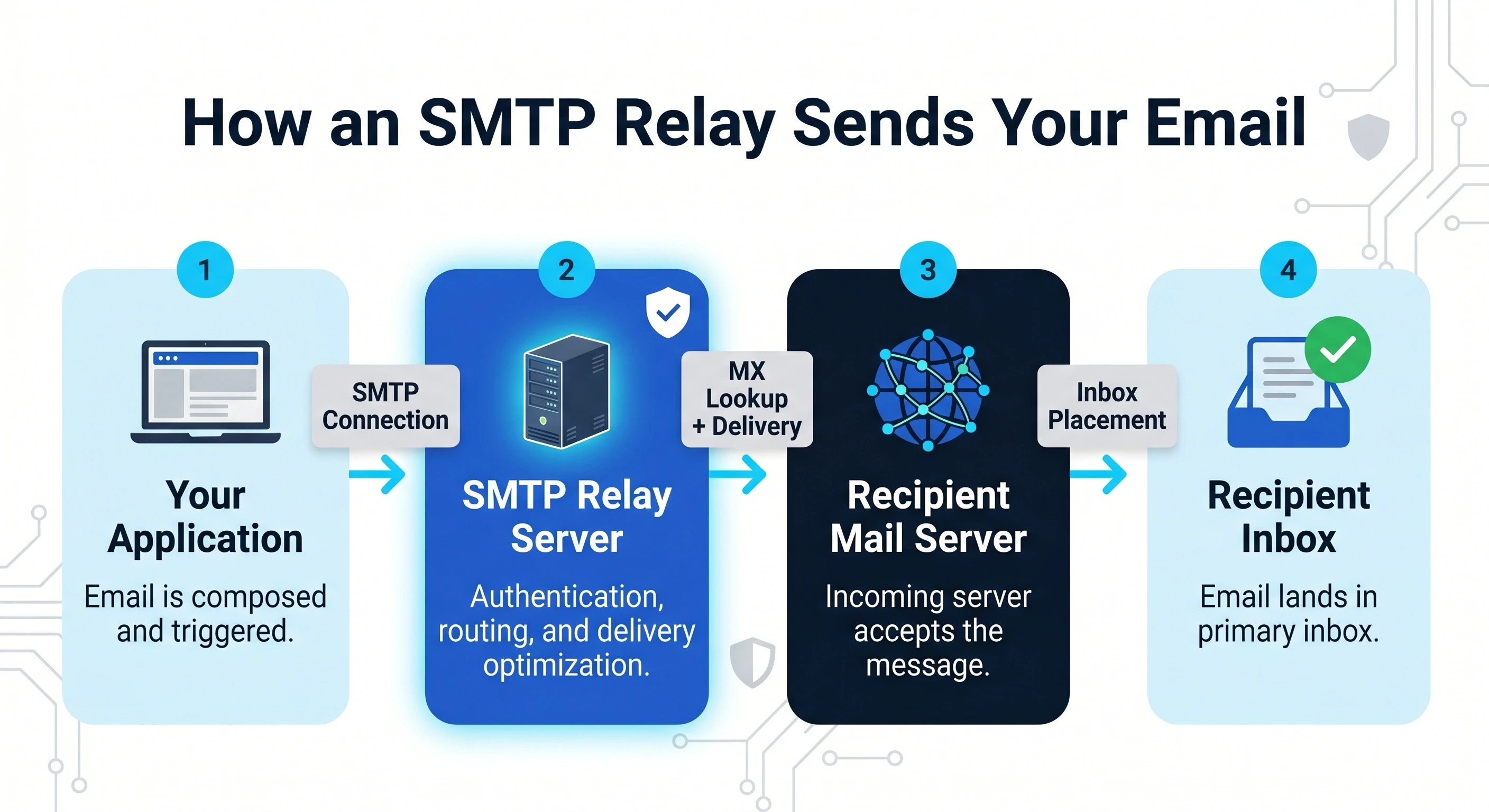
How the SMTP Relay Process Works Step-by-Step
While the transition from your application to a recipient's inbox happens in a matter of seconds, the SMTP relay service executes a sophisticated multi-step communication protocol. Breaking this down helps identify where deliverability can be optimized.
Handshake: Your application or email client initiates a connection with the SMTP relay server. The client sends an EHLO or HELO command, essentially asking the server if it is ready to receive data.
Authentication: To ensure security and prevent unauthorized spamming, the relay service requires verification. This is usually handled via SMTP AUTH using a username and password or by whitelisting the sending IP address.
Transfer: Once authenticated, the sender provides the "Envelope" information (the sender’s address and the recipient’s address) followed by the actual email content. The relay server confirms receipt of the data.
Receipt: The relay service performs a DNS lookup for the recipient’s domain to find the destination mail exchange (MX) record. It then transmits the email to the recipient's incoming mail server for final delivery.
The Journey of a Transactional Email
For high-priority messages like password resets, order confirmations, or account alerts, speed is critical. A transactional email follows this relay process via an API or SMTP integration to bypass the limitations of standard web hosts.
By using a dedicated SMTP relay service, these automated messages are routed through optimized infrastructure. This ensures that even if your main website experiences a surge in traffic, your critical notifications aren't delayed. Furthermore, the relay process ensures that your technical setup—including SPF, DKIM, and DMARC—is correctly aligned, which is essential for how spam filters grade your emails and determine whether they land in the inbox or the junk folder.
Public vs. Private SMTP Relays: Which Should You Choose?
Selecting the right environment for your smtp relay service depends largely on your sending volume, budget, and the level of risk you are willing to accept regarding your sender reputation. Most providers offer two distinct paths: shared infrastructure (public) or dedicated infrastructure (private).
Public Relays and Shared Environments
A public SMTP relay operates on a shared environment where multiple organizations send their emails through a common pool of servers and IP addresses. This is the standard model for most entry-level and mid-tier email service providers.
The primary advantage of a shared environment is affordability. Because the infrastructure costs are distributed across thousands of users, it is highly cost-effective for startups or businesses with lower sending volumes. However, the downside is the "bad neighbor" effect. If another company sharing your IP sends spam or generates high bounce rates, the reputation of that IP drops, potentially causing your legitimate emails to be flagged as spam or blocked by ISPs.
Private Relays and Dedicated Infrastructure
A private SMTP relay utilizes dedicated infrastructure, meaning your email traffic is isolated from other senders. This often includes a dedicated IP address that only your organization uses.
This model is designed for high-volume senders and enterprises that require total control over their deliverability. With a private relay, your reputation is based solely on your own sending practices. You don't have to worry about the mistakes of other companies affecting your inbox placement. While this requires a higher level of scrutiny and "warming up" the IP, it provides the most stable environment for mission-critical communications.
The Cost vs. Control Trade-off
The decision between public and private relays ultimately comes down to a trade-off between cost and control. Public relays offer a low-cost, "plug-and-play" solution with minimal management overhead, but they force you to sacrifice control over the underlying IP reputation. Conversely, private relays require a higher financial investment and more technical oversight, but they grant you full autonomy over your email ecosystem and long-term deliverability success.
As a general rule, enterprises should migrate from a public to a private SMTP relay once their monthly volume exceeds 100,000 emails or when the cost of a single missed delivery outweighs the monthly premium of dedicated infrastructure.
SMTP Relay vs. SMTP Server: Understanding the Differences
How to Configure Your SMTP Relay Service
Setting up an SMTP relay service is a straightforward process, but precision is required to ensure high deliverability and security. Follow these steps to integrate your application or mail server with a professional relay provider like MissionInbox.
Step 1: Selecting a Provider
The first step is choosing a provider that matches your sending volume and technical requirements. For high-volume senders, look for features such as dedicated IP addresses, AI-powered deliverability monitoring, and robust bounce management. Once you sign up, you will be provided with specific SMTP credentials (host, port, username, and password) or an API key for integration.
Step 2: Authenticating Your Domain
To prevent your emails from being flagged as spam, you must verify that you are an authorized sender for your domain. This involves adding specific records to your DNS settings. Following industry best practices, such as those defined by M3AAWG, is essential for maintaining a positive sender reputation and ensuring global mailbox providers trust your traffic.
Step 3: Configuring Credentials and Port Usage
After your domain is authenticated, you must update your application or legacy mail server settings to point to the new SMTP relay. Accuracy here is critical for both connectivity and data security.
Use the following checklist to ensure your connection is configured correctly:
SMTP Host: Enter the server address provided by your relay service (e.g., smtp.missioninbox.com).
Authentication: Use your API Key or SMTP username and password. API keys are generally more secure for application integrations.
Port 587: This is the preferred port for modern SMTP relay. It is designed for mail submission and supports STARTTLS encryption.
Encryption: Always enable STARTTLS or TLS to encrypt the communication between your server and the relay, protecting sensitive data from interception.
Port 465 (Alternative): Use this port if your system requires Implicit TLS/SSL from the start of the connection, though 587 remains the standard recommendation for most configurations.
By utilizing Port 587, you ensure that your outbound mail is handled via a secure, authenticated channel that is widely accepted by ISPs and corporate firewalls.
SMTP Relay for Gmail, Outlook, and Azure Platforms
Popular email providers like Google, Microsoft, and Azure offer their own SMTP relay solutions. While these are convenient for users already within those ecosystems, they often come with strict sending limits and security configurations that can impact email deliverability if not managed correctly.
Gmail SMTP Relay Setup
For businesses using Google Workspace, the Gmail SMTP relay service allows you to route outgoing mail through Google’s infrastructure. This is commonly used for printers, scanners, or internal apps that need to send notifications.
However, Google has significantly tightened security. As of late 2024, the "Less Secure Apps" setting—which previously allowed apps to log in with just a username and password—has been fully deprecated. To use Gmail as an SMTP relay now, you must:
Enable 2-Step Verification on the Google account.
Generate a unique 16-digit App Password.
Use this App Password in place of your standard Gmail password in your application’s SMTP settings.
Failure to use App Passwords or OAuth 2.0 will result in authentication errors. Additionally, keep in mind that Google Workspace has a strict limit of 2,000 messages per day per user; exceeding this will temporarily suspend your sending capabilities.
Office 365 and Outlook Relays
Microsoft offers several ways to relay email through Exchange Online. The most common method for third-party applications is SMTP AUTH client submission.
Authentication: Much like Google, Microsoft is moving away from "Basic Authentication." Enterprises are encouraged to use Modern Authentication (OAuth 2.0).
Direct Send: Useful if you only need to send to recipients within your own organization. It doesn't require a licensed mailbox but cannot send to external addresses.
Microsoft 365 SMTP Relay: This involves creating a connector in the Exchange Admin Center. It is ideal for high-volume internal devices or applications that share a single public IP address.
Using a relay within the Microsoft ecosystem helps maintain your sender reputation, but it requires careful SPF and DKIM configuration to ensure your emails don't end up in the "Junk" folder.
Ready to Fix Your Deliverability?
Better infrastructure means higher reply rates, and more revenue from the same campaigns.
For developers and enterprise architects, Azure Communication Services (ACS) provides a cloud-native, highly scalable way to integrate email into applications. Unlike standard mailbox relays, ACS is built specifically for high-volume transactional messaging.
Key features of ACS SMTP Relay include:
Seamless Azure Integration: ACS integrates directly with Azure Managed Identities, allowing your applications to authenticate without managing hardcoded credentials or secrets.
Dedicated Email Resource: You can provision a dedicated Email Communication Service resource, which provides a clean separation between your corporate mailboxes and your application traffic.
Custom Domain Support: Azure allows you to verify and send from your own custom domains, ensuring that your branding remains consistent.
Enhanced Security: It supports SMTP over port 587 with STARTTLS, providing encrypted transit for all relayed messages.
By using ACS, enterprise users can avoid the daily sending caps associated with standard Office 365 mailboxes while benefiting from the global reliability of Microsoft’s infrastructure. For businesses requiring AI-powered protection and even deeper deliverability insights, integrating these relays with a platform like MissionInbox can provide a critical layer of reputation management.
Security Risks: Open Relays and AI-Powered Protection
Managing an SMTP relay service involves more than just passing data from point A to point B; it requires a robust defense against exploitation. Without proper configuration and monitoring, your email infrastructure can quickly transform from a business asset into a liability.
The Dangers of an Open Relay
An open relay is an SMTP server that is configured to allow anyone on the internet to send email through it. In the early days of the web, this was often the default setting to facilitate easy communication. Today, an open relay is a catastrophic security flaw.
When a server is "open," spammers and malicious actors can hijack your bandwidth and IP reputation to send millions of unsolicited emails. Because the mail originates from your server, ISP filters will associate the spam with your domain and IP address. This leads to immediate blacklisting, preventing your legitimate business emails from reaching their destination. To keep your infrastructure secure, follow our guide to preventing open relays and ensure your SMTP AUTH (authentication) protocols are strictly enforced.
Leveraging AI for Email Infrastructure Security
Modern SMTP relay services now integrate Artificial Intelligence (AI) to defend against sophisticated threats that static rules might miss. Unlike traditional firewalls that only check if a user has the right password, AI-powered protection analyzes the behavioral context of every sending session.
A specific example of this is the detection of anomaly sending patterns. Imagine a marketing team that typically sends 5,000 newsletters every Tuesday at 10:00 AM. If the SMTP relay suddenly detects an attempt to send 100,000 emails to high-risk or non-existent domains at 3:00 AM on a Saturday, the AI recognizes this as an "anomaly." Even if the credentials used are valid, the system can automatically throttle the volume or lock the account in real-time to prevent a reputation-destroying event.
Blacklisting and Account Takeover Prevention
The speed of the modern web means that an Account Takeover (ATO) can result in your IP being blacklisted globally in under 15 minutes. By the time a human administrator notices a spike in bounce rates, the damage is already done. AI-driven security acts as a 24/7 sentry, identifying compromised accounts by spotting subtle shifts in metadata—such as a change in the originating geographic location or the "burstiness" of the traffic—and neutralizing the threat before your server's reputation is compromised.
Troubleshooting and Verifying Your SMTP Relay Setup
Setting up an smtp relay service is only half the battle; ensuring it actually delivers mail to the inbox requires a systematic verification process. Before you scale your sending, follow this three-step framework to confirm your infrastructure is airtight.
The 3-Step Verification Process
1-Test Connectivity via Telnet
The most reliable way to verify your connection to the relay server is by using the Telnet command. This bypasses your email client’s interface to test the raw handshake between your machine and the SMTP server.
Open your terminal or command prompt.
Run the command: telnet smtp.missioninbox.com 587 (or port 25).
What to look for: If you see a response starting with 220, the connection is successful. If it times out, a firewall or ISP is likely blocking that port.
2- Monitor Deliverability Metrics
Once connected, send a series of test emails to different providers (Gmail, Outlook, etc.). Use your email infrastructure dashboard to monitor real-time delivery status. Look for high "Accepted" rates and zero initial "Blocks."
3- Audit Your SMTP Logs
Review your application or server logs for the full SMTP transcript. These logs contain the specific response codes from the receiving server, which are vital for diagnosing why an email might be delayed or rejected.
Common Errors and Their Solutions
Understanding SMTP response codes is essential for rapid troubleshooting. Most errors fall into the 4xx (temporary) or 5xx (permanent) categories.
SMTP Relay Tables — Mission Inbox
Mission Inbox — Blog Asset
Common SMTP Error Codes and How to Fix Them
Error Code
Meaning
Common Cause
Solution
550
Relay Access Denied
Your IP is not authorized or recipient mailbox does not exist.
Verify your SMTP credentials and ensure your sending domain is fully authenticated with SPF, DKIM, and DMARC.
535
Authentication Failed
Incorrect username or password entered in SMTP settings.
Re-enter your SMTP credentials. Check if your API key has expired or been revoked.
421
Service Not Available
The receiving server is overloaded or you are being throttled for sending too fast.
Reduce your sending frequency. Check your domain reputation score. Increase send interval in your sequencer.
554
Transaction Failed
Your message was flagged as spam by the recipient's filters.
Check your email content for spam trigger words. Verify SPF, DKIM, and DMARC records are correctly configured.
250
OK — Accepted
Email was successfully accepted by the receiving server.
No action needed. Email is in transit to the recipient's inbox.
220
Server Ready
Connection to the SMTP relay server was successful.
No action needed. This confirms your connectivity test passed.
Mission Inbox provides real-time SMTP error monitoring and automatic alerts before delivery issues escalate to blacklisting.
Advanced Mail-Testing Tools
While Telnet is excellent for connectivity, third-party tools provide deeper insight into how your smtp relay service interacts with spam filters:
Mail-Tester: Provides a "spam score" by analyzing your email headers, body content, and authentication records.
MXToolbox: A comprehensive suite for checking if your dedicated IP is on any blacklists and verifying DNS health.
Mission Inbox AI Protection: Automatically monitors your SMTP mailboxes for reputation dips and provides actionable alerts before your deliverability suffers.
Scaling Email Infrastructure for Modern Deliverability
As organizations grow, their email requirements evolve from simple communication to high-volume operational and marketing traffic. Scaling this infrastructure effectively requires moving away from fragmented, ad-hoc systems toward a unified architecture. A critical milestone in this growth is transitioning from shared environments to more controlled dedicated IP email services. By isolating your sending reputation, you ensure that high-volume bursts from other users do not impact your own inbox placement rates.
Proper scaling isn't just about volume; it is about maintaining reputation integrity across every message sent. When infrastructure is decentralized, it becomes nearly impossible to enforce consistent SPF, DKIM, and DMARC policies, which are the bedrock of modern deliverability.
The Role of Centralized Infrastructure Management
Managing global delivery at scale requires a deep synergy between optimized hardware, standardized SMTP protocols, and AI-driven logic. Centralized management allows your technical team to monitor bounce rates, latency, and throughput across all sender identities from a single pane of glass.
Modern SMTP relay services now leverage AI to predict potential blocks before they happen. This intelligence layer monitors recipient server feedback in real-time, automatically adjusting sending rates or rerouting traffic to maintain a healthy sender score. By integrating AI protection with dedicated hardware, businesses can mitigate the risks associated with sudden spikes in volume or temporary ISP outages.
Audit your current email deliverability and consider migrating to a dedicated SMTP relay with AI protection.
Ready to Drive More Revenue?
Same Campaigns. Better Results. Switch to dedicated infrastructure and watch your reply rates climb.
An SMTP relay service is a third-party provider that transmits email messages from your application or server to the recipient’s mail server. It acts as an intermediary to ensure high deliverability, security, and scalability for high-volume senders.
Why should I use an SMTP relay instead of my own server?
While you can run your own server, an SMTP relay service provides managed infrastructure. This includes handling ISP relations, managing IP reputations, ensuring compliance with authentication protocols (like DMARC), and providing detailed analytics that a standard server lacks.
Does an SMTP relay improve email deliverability?
Yes. By using a reputable relay service, your emails are sent through optimized servers with established reputations. These services also provide tools for cleaning lists and managing bounces, which are essential for staying out of the spam folder.
What is the difference between a shared and a dedicated IP?
A shared IP is used by multiple senders, making it cost-effective for lower volumes. However, your reputation is tied to the other senders. A dedicated IP is used exclusively by your organization, giving you total control over your sender reputation and is highly recommended for high-volume senders.
Can I integrate an SMTP relay with my existing CRM?
Most modern CRM platforms and applications allow you to swap out default mail settings for an SMTP relay. You simply need the host, port, username, and password provided by your relay service to complete the integration.
SMTP Relay Service FAQs
Can I use my own domain with an SMTP relay service?
Yes, using your own domain is a standard requirement for professional email delivery. By configuring SPF, DKIM, and DMARC records on your DNS, you authorize the relay service to send on your behalf. This technical alignment is vital for maintaining brand identity and building a long term sender reputation with mailbox providers.
Is there a limit to how many emails I can send via SMTP relay?
While traditional internet service providers impose strict daily limits to prevent spam, dedicated SMTP relay services are designed for high volume output. Sending limits are typically determined by your specific subscription tier or the health of your sender reputation. Scalable infrastructure allows businesses to move from hundreds of messages to millions without technical friction.
What is the difference between an SMTP relay and an Email API?
An SMTP relay uses a standard protocol to transmit data between servers, making it compatible with almost any legacy application or hardware. In contrast, an Email API uses RESTful architecture to integrate email functionality directly into a web application. While APIs often offer faster transmission and more granular reporting, SMTP remains the universal standard for broad system compatibility.
How does an SMTP relay affect email deliverability?
Using a reputable relay service significantly improves deliverability by offloading the technical complexities of server management. These services provide access to warmed IPs and advanced throttling logic that respects recipient server requirements. Maintaining this level of operational excellence ensures that your critical communications bypass junk folders and reach the intended inbox. Protecting these delivery assets requires more than just standard protocols.
Secure Your Email Delivery Future
Evaluation of your current infrastructure is the first step toward achieving consistent inbox placement and long term growth. Transitioning to a dedicated SMTP relay service allows you to leverage AI powered protection that monitors for sending anomalies and safeguards your sender reputation against emerging digital threats.
Share article
Send with Protection
Stop relying on shared infrastructure that you don't control. Mission Inbox gives you dedicated servers, dedicated IPs, and full ownership of your sending reputation.
Stop relying on shared infrastructure that you don't control. Mission Inbox gives you dedicated servers, dedicated IPs, and full ownership of your sending reputation.
Thank you! Your submission has been received!
Oops! Something went wrong while submitting the form.
Before you go
Get a free deliverability consulting call
Grab 30 minutes with our deliverability team. We'll audit your domains, mailboxes and sending volume live, and show you exactly where your placement is leaking. No pitch, no obligation, no card.
See how much pipeline shared infrastructure is making you lose
Spot burned domains and bad IP neighbors before they tank a campaign
See the campaign performance differences between Mission Inbox senders and other providers




.svg)
.svg)