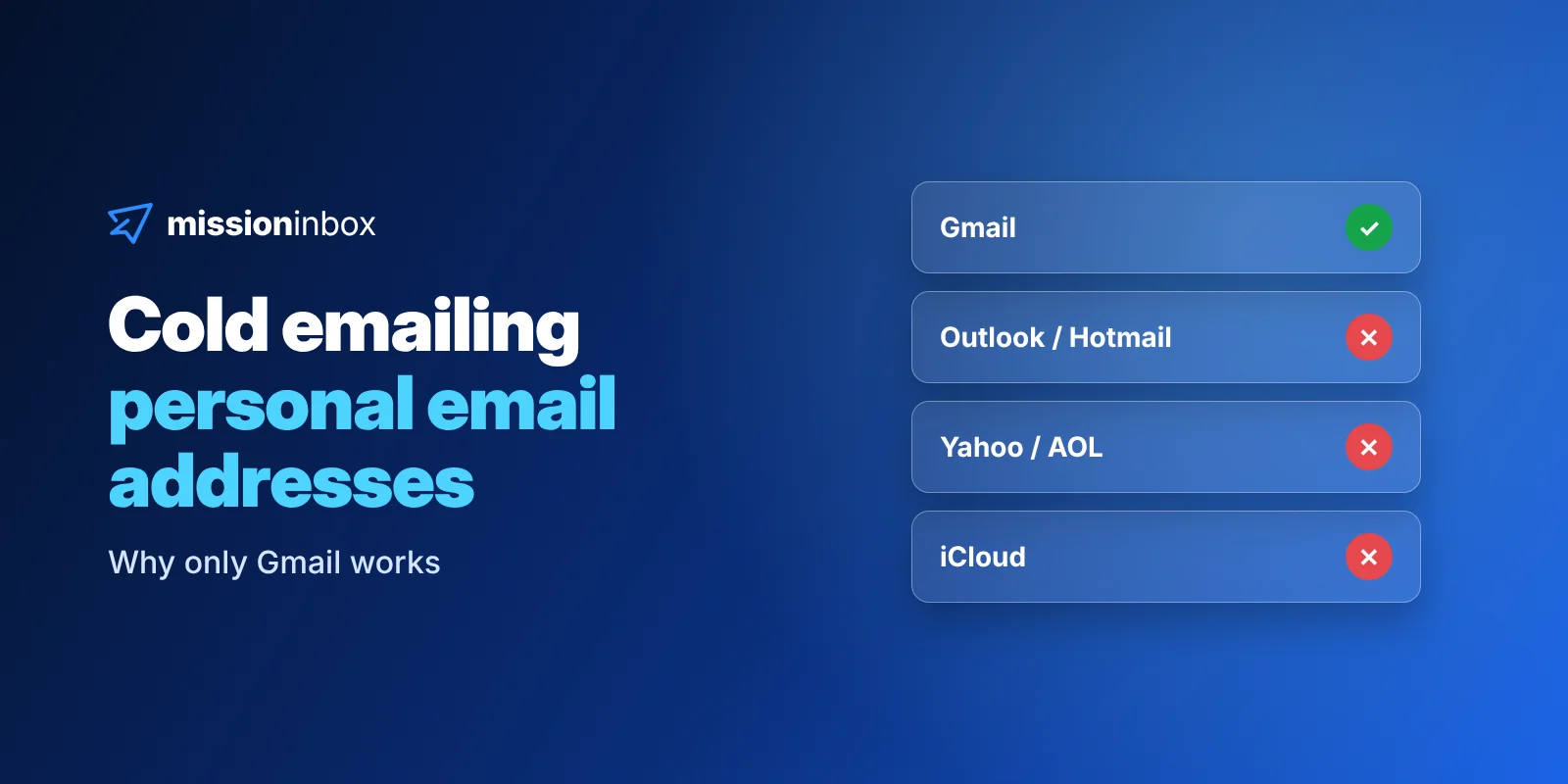
Why cold emails to personal addresses only work for Gmail, and how Outlook, Yahoo and iCloud treat them.
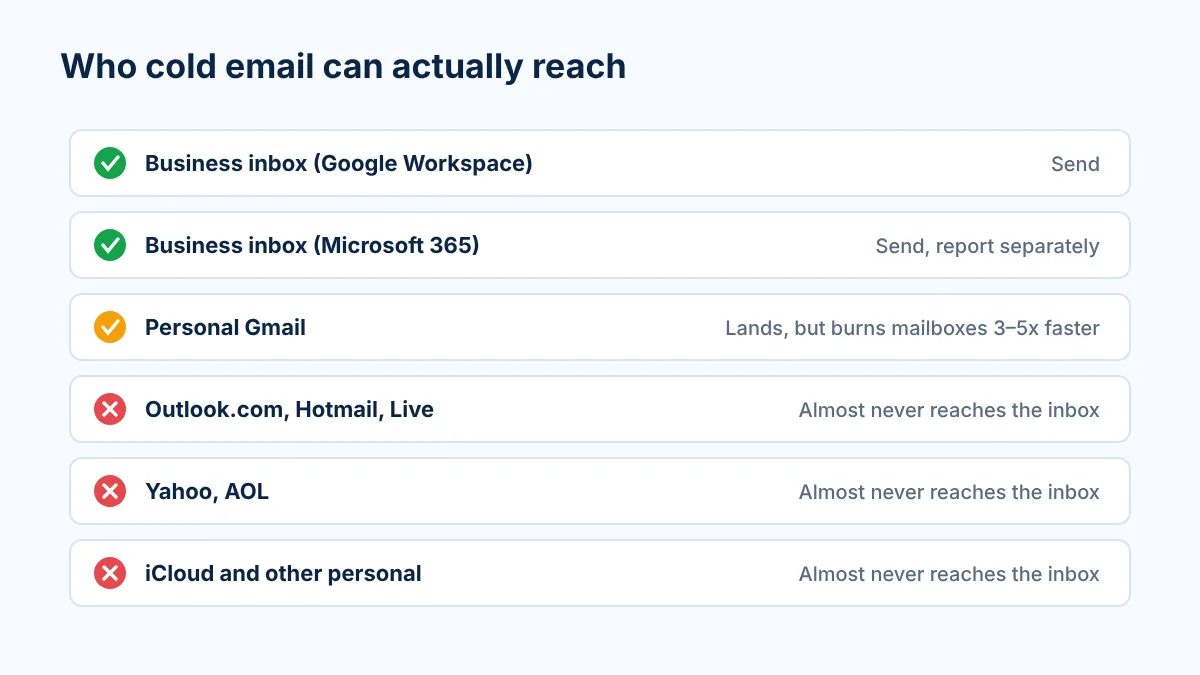
Short answer: if you're cold emailing personal addresses, only Gmail is worth sending to. Free consumer inboxes like Outlook.com, Hotmail, Live, Yahoo, AOL, iCloud, GMX, AT&T and Proton almost never put an unsolicited email in the inbox, no matter how good your copy or infrastructure is. Gmail will still land and get replies, but it burns your sending mailboxes about 3 to 5x faster than sending to business inboxes.
If you've been scraping local businesses off Google Maps and wondering why your reply rate looks broken, this is very likely why. Below is what's actually happening, how to check your own data in about an hour, and how to run Gmail properly if it's a real part of your market.
Last updated: November 2026
Why are local-business lists full of personal email addresses?
Because that's how small businesses set themselves up online.
When a roofer, a dentist or a landscaping company in the US creates a Google Business Profile, a lot of them just use the address they already have. That ends up being something like companyname@gmail.com, or the owner's old Hotmail or Yahoo account. It's a real business, with a real phone number and real reviews. The email is still a personal account.
So when you pull leads from Google Maps, whether it's through a provider like LocalPipe.io or your own Apify scraper, a big chunk of what comes back is free-mail addresses. The rest tends to be role inboxes like info@ or contact@ on the company's own domain.
I tell people this on every call where it comes up: it's not your fault. You didn't buy a bad list. The business literally chose to put a Gmail address on its profile. But it does change the deliverability math completely, and most teams never separate those addresses from the business ones.
Personal accounts vs business accounts: why the spam filter treats them differently
Here's the part that surprises people. The spam filter doesn't care what an email address is used for. It cares what kind of account it is.
A Google Workspace or Microsoft 365 mailbox on a company domain is a business account. Businesses email businesses all day. The filters behind those mailboxes are built for professional contact, and they expect cold outreach to exist.
A free @gmail.com, @hotmail.com or @yahoo.com address is a personal account, even if the owner uses it to run a business. The filters behind consumer inboxes are built for one main job: protecting regular people from phishing, spoofing and scams. Think fake invoices, fake "your account is locked" notices, fake tech support. The way I put it in our cheat sheet: Workspace assumes the recipient is a professional who can handle a cold email, while a consumer inbox assumes the recipient is your grandmother.
That's a good thing, by the way. You wouldn't want your grandma getting scammed either. The side effect is that legitimate cold email gets caught in a net that was never meant for it.
You can see the split in the providers' own documentation:
Google says its email sender guidelines apply when sending to personal Gmail accounts, meaning addresses ending in @gmail.com or @googlemail.com, and that the requirements and enforcement do not apply to Google Workspace accounts (Google sender guidelines FAQ, Email sender guidelines). Personal Gmail and Workspace are filtered separately.
Microsoft introduced stricter requirements for high-volume senders in 2025 for Outlook.com, its consumer service covering hotmail.com, live.com and outlook.com addresses, including rejecting non-compliant mail and telling senders to make sure recipients have consented (Microsoft Tech Community announcement).
Yahoo tells senders to keep spam complaints under 0.3%, to send only to users who specifically requested mail, and not to purchase mailing lists (Yahoo sender best practices).
None of these say "cold email is banned." What they show is that consumer inboxes run on consent-first, consumer-protection rules that are separate from business mail. In practice, after years of sending and reviewing campaign data, that means an unsolicited email to a free Hotmail, Outlook.com or Yahoo address almost never reaches the inbox. Sometimes it lands in spam. Often it's rejected outright and bounces.
One clarification so nobody mixes these up: a Microsoft 365 business mailbox on a company domain is not the same thing as a personal Outlook.com or Hotmail address. Microsoft 365 business deliverability is its own (very real) problem, with its own fixes. This post is about personal inboxes.
Provider by provider: who you can actually reach
Here's how I break it down for anyone sending to local-business or B2C-style lists.
Recipient type
Example addresses
What cold email can expect
What to do
Business inbox on Google Workspace
name@company.com (hosted by Google)
The target. Built for professional contact.
Send
Business inbox on Microsoft 365
name@company.com (hosted by Microsoft)
Reachable, but stricter on domain age and IP reputation.
Send, report it separately
Personal Gmail
@gmail.com, @googlemail.com
Workable. Lands and gets replies, but burns mailboxes about 3 to 5x faster.
Own campaign, own mailboxes
Personal Microsoft
@outlook.com, @hotmail.com, @live.com, @msn.com
Almost never reaches the inbox. Often rejected outright.
Remove
Yahoo and AOL
@yahoo.com, @ymail.com, @aol.com
Almost never reaches the inbox.
Remove
Apple
@icloud.com, @me.com, @mac.com
Almost never reaches the inbox.
Remove
Other personal and ISP providers
@gmx.com, @att.net, @proton.me, @comcast.net
Almost never reaches the inbox.
Remove
Why does Gmail behave differently from the rest? In my experience, Gmail is simply more flexible with cold email than the other consumer providers. You can send from a Google or Microsoft mailbox to a personal Gmail address and get a reply. You just pay for it in mailbox lifespan, which we'll get to.
The legacy providers (Yahoo, AOL, Hotmail, Outlook.com) also skew toward older users, which is exactly the group those filters are tuned hardest to protect.
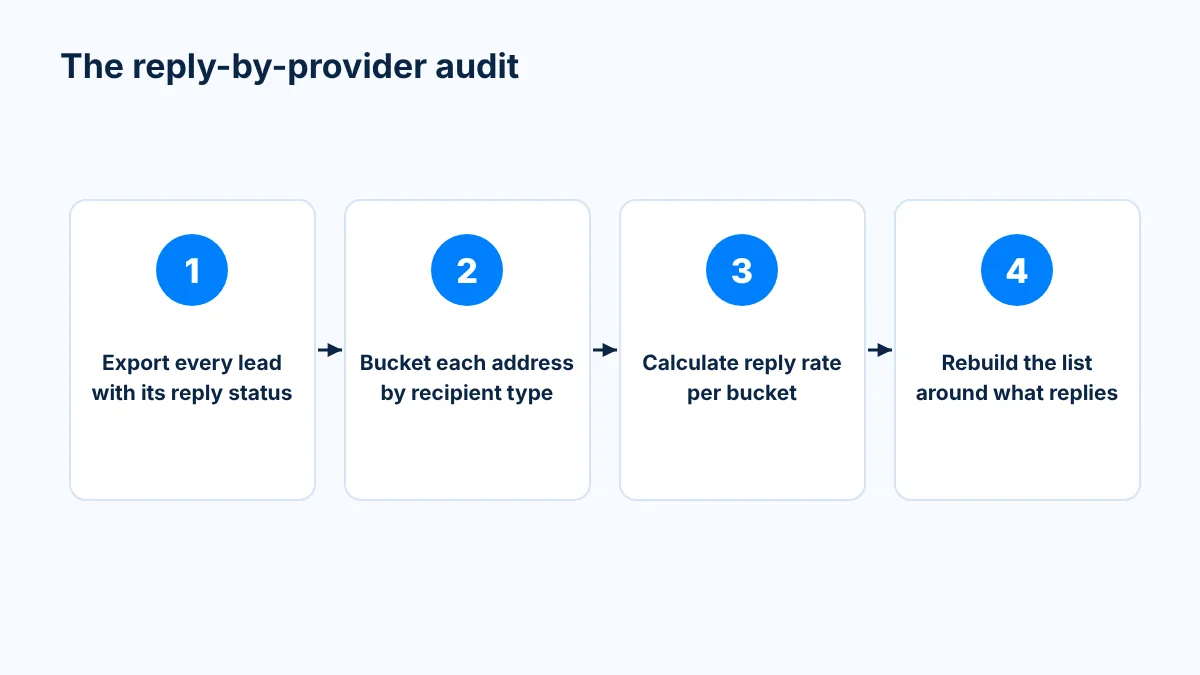
Check your own data: the reply-by-provider audit
Don't take my word for it. Pull your own numbers.
I've done this exercise with my own campaigns and with client campaigns more times than I can count, and the answer is always the same. People find out they were sending a huge amount of volume to recipients who were never going to see the email. When they look at where the replies actually came from, almost none came from Hotmail, Outlook.com or Yahoo.
Here's the step-by-step. You can do it from a CSV export in a spreadsheet, or have someone script it against your sequencer's API.
Step 1: Export every lead with its reply status
Every major sequencer lets you export leads per campaign with their status. If you'd rather automate it, grab your API key. Instantly, Smartlead and EmailBison all expose leads and reply status through their APIs, so you can pull every campaign at once instead of clicking through them.
Step 2: Bucket each address by recipient type
Start with the free-mail domains, which you can match by the text after the @:
Gmail: gmail.com, googlemail.com
Microsoft consumer: outlook.com, hotmail.com (and country versions), live.com, msn.com
Yahoo family: yahoo.com (and country versions), ymail.com, aol.com
Apple: icloud.com, me.com, mac.com
Others: gmx.com, att.net, sbcglobal.net, proton.me, protonmail.com, and ISP addresses like comcast.net or verizon.net
Everything left is on a company domain. For those, run an MX lookup to see who hosts the mailbox. Google's public DNS endpoint is free and easy to script: https://dns.google/resolve?name=example.com&type=MX, then group the results by host.
If the MX record contains
Bucket it as
google.com or googlemail.com
Google Workspace
mail.protection.outlook.com
Microsoft 365
pphosted.com
Proofpoint security gateway
mimecast.com
Mimecast security gateway
barracudanetworks.com
Barracuda security gateway
Anything else
Other or self-hosted
Step 3: Calculate reply rate per bucket
For each bucket, count leads contacted, emails sent, replies, positive replies and bounces. Then calculate reply rate and positive reply rate per bucket instead of per campaign. A blended campaign number hides everything. A campaign that "does 1%" can really be a healthy business segment carrying a dead consumer segment.
Step 4: Rebuild the list
Drop the buckets with meaningful volume and zero replies. Move personal Gmail into its own campaign (more on that below). Keep business recipients together, or split them further by provider if you want cleaner reporting.
What this usually looks like
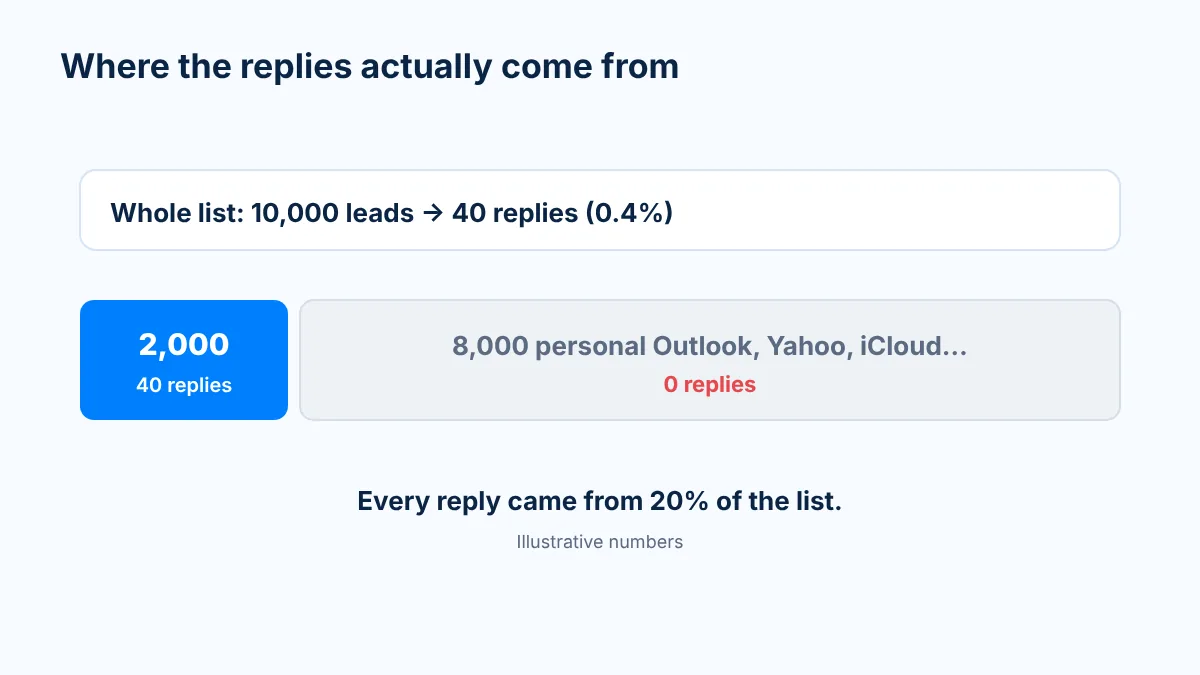
Here's an illustrative example of the pattern I keep seeing on scraped local-business lists. The numbers are made up to show the math, not taken from a specific client.
Illustrative segment
Leads
Replies
Reply rate
Business domains and personal Gmail
2,000
40
2.0%
Hotmail, Outlook.com, Yahoo, AOL, iCloud and other personal providers
8,000
0
0%
Whole list, as the campaign reports it
10,000
40
0.4%
It sounds counterintuitive to shrink your list from 10,000 recipients to 2,000. But the people who were going to reply were always in those 2,000. You were never going to get a reply from the other 8,000, because the email never reached them. What you did get from those 8,000 was blocks, bounces and spam complaints, all charged against the same mailboxes that were trying to reach the 2,000 people who mattered.
Cut them and your reported reply rate goes from 0.4% to 2%, with the same replies, a fraction of the sending volume and far less damage to your mailboxes. You could have been better off talking only to the right recipients from day one.
Why Gmail still burns your mailboxes faster
Gmail is the exception, not a free pass. Sending to personal Gmail addresses burns sending mailboxes about 3 to 5x faster than sending to business inboxes, in our experience. Here's why.
Warm-up pools don't include personal Gmail
Most warm-up is peer-to-peer. The warm-up pools inside the big sequencers (Instantly, Smartlead, EmailBison and the rest) work by having customers connect their own sending mailboxes, which then email, open, reply to and rescue each other's messages from spam.
That's a good thing for business sending. Every one of those pool mailboxes is a Google Workspace, Microsoft 365 or SMTP account, so while your mailbox warms up it builds history with exactly the kind of business inboxes you'll be cold emailing.
Now look at what's missing. A personal Gmail account can't be connected to a sequencer for outbound sending, so it can't join a warm-up pool. That means there isn't a single personal @gmail.com address in any of those pools.
You could warm a mailbox for six months and it would never have sent one email to a personal Gmail account. The first time it does, it's going in blind.
No offset for negative signals
Warm-up isn't only about building reputation. It's also what offsets the negative signals every cold campaign produces, like the occasional "report spam."
When a business recipient reports you, there's a long trail of positive warm-up interactions with that provider to balance it out. With personal Gmail there's nothing. Every complaint counts at full weight.
Here's the math I use on calls. Say a mailbox sends 30 cold emails to personal Gmail addresses in a day and 3 people mark it as spam. From that recipient provider's point of view, that's a 10% complaint rate on your mailbox. Yahoo's published ceiling is 0.3%, and you really want to be well under that.
Placement tests are mostly blind here too
Most inbox placement tests use seed accounts on Google Workspace and Microsoft 365. Those tell you nothing about personal Gmail, because personal Gmail and Workspace are filtered separately. I've seen setups that look perfect on Workspace seeds and still go to spam on personal Gmail. If personal Gmail is your audience, reply rate from those recipients is the signal you can trust.
Recipients
Warm-up history with that provider
Typical mailbox lifespan (our experience)
Business inboxes (Google Workspace, Microsoft 365)
Yes, built every day in peer-to-peer pools
About 2 to 3 months
Personal Gmail
None, personal Gmail can't join a pool
About a month (3 to 5x faster burn)
Other personal providers
None
Not really a lifespan question: they rarely reach the inbox at all
What to do if Gmail is a real part of your market
If you sell to local businesses, a lot of your best prospects will live on Gmail. That's fine. Just run them on purpose instead of by accident.
Separate them. Put personal Gmail recipients in their own campaign with their own group of mailboxes. Keep them out of the business campaigns so one doesn't drag down the other, and so you can read each segment's reply rate cleanly.
Plan for shorter mailbox lifespans. Budget for rotation from the start. A simple rhythm is about 2 weeks of warm-up, about 2 weeks of sending, then swap in a fresh batch while the old one rests. Keep warm-up running the whole time.
Keep volume per mailbox conservative. Lower daily sends per mailbox give each complaint less room to do damage.
Write like a person. Personal inboxes have a Promotions tab and business inboxes don't. Short, casual, plain-text messages that read like a text from someone you know do much better than anything that looks like marketing. No images, no heavy links, no tracking pixels.
Watch complaints and replies, not vanity metrics. Keep spam complaints well under 0.3% and judge the segment on replies and positive replies.
Drop everything else. Strip Outlook.com, Hotmail, Live, MSN, Yahoo, AOL, iCloud, GMX, AT&T, Proton and other personal providers before you upload. They won't reply, and they'll make every other number in your account worse.
Prefer the business address when there is one. If a Google Maps result also has a website, check for an address on the company's own domain and use that instead of the Gmail.
Can you send cold email to personal Gmail addresses?
Yes. Personal Gmail is the one consumer inbox where cold email can still land and get replies. Expect it to burn your sending mailboxes about 3 to 5x faster than business recipients, so give it its own campaign and its own mailboxes.
Why don't cold emails reach Hotmail, Outlook.com or Yahoo addresses?
Consumer inboxes are filtered to protect individuals from phishing and spoofing, and they're policed consent-first. Unsolicited email from a sender the person never contacted almost never reaches the inbox, and it's often rejected outright.
Why are Google Maps lead lists full of Gmail addresses?
Many small US businesses set up their Google Business Profile with a free address like companyname@gmail.com. The business is real, but the spam filter only sees a personal account.
How do I find out which email providers actually reply to my campaigns?
Export your leads with reply status from your sequencer, bucket each address by free-mail domain or MX lookup, and calculate reply rate per bucket. Most teams find replies come from business inboxes and Gmail, and almost none from Hotmail, Outlook.com or Yahoo.
Why do mailboxes burn faster when sending to Gmail?
Warm-up pools are made of business mailboxes, because personal Gmail accounts can't connect to a sequencer. Your mailbox builds no positive history with personal Gmail, so every spam report there counts at full weight.
Is it worth removing Hotmail, Outlook and Yahoo addresses from my list?
Yes. They rarely produce replies but still generate blocks and complaints. Your list gets smaller, your replies stay the same, and your mailboxes last longer.
The short version
Cold email works when it reaches people who can reply. On local-business and B2C-style lists, that means business inboxes and personal Gmail. Everything else on the consumer side mostly just costs you mailboxes.
Pull your reply data by provider once and you'll never build a list the old way again. If you want the full set of rules we use to keep mailboxes alive, including the Google Maps section and the personal Gmail section this post is based on, grab The Deliverability Cheat Sheet. It's free.
Hopefully in your inbox,
Tony
Share article
Read Time
13 MIN READ
Category
Deliverability
Send with Protection
Stop relying on shared infrastructure that you don't control. Mission Inbox gives you dedicated servers, dedicated IPs, and full ownership of your sending reputation.
Can you send cold email to personal Gmail addresses?
Why don't cold emails reach Hotmail, Outlook.com or Yahoo addresses?
Why are Google Maps lead lists full of Gmail addresses?
How do I find out which email providers actually reply to my campaigns?
Why do mailboxes burn faster when sending to Gmail?
Is it worth removing Hotmail, Outlook and Yahoo addresses from my list?
Send at volume with Mission Inbox
Stop relying on shared infrastructure that you don't control. Mission Inbox gives you dedicated servers, dedicated IPs, and full ownership of your sending reputation.
Thank you! Your submission has been received!
Oops! Something went wrong while submitting the form.
Before you go
Get a free deliverability consulting call
Grab 30 minutes with our deliverability team. We'll audit your domains, mailboxes and sending volume live, and show you exactly where your placement is leaking. No pitch, no obligation, no card.
See how much pipeline shared infrastructure is making you lose
Spot burned domains and bad IP neighbors before they tank a campaign
See the campaign performance differences between Mission Inbox senders and other providers