Everything you need to plan cold email on subdomains in 2026, from structure and capacity to warm-up and scaling.
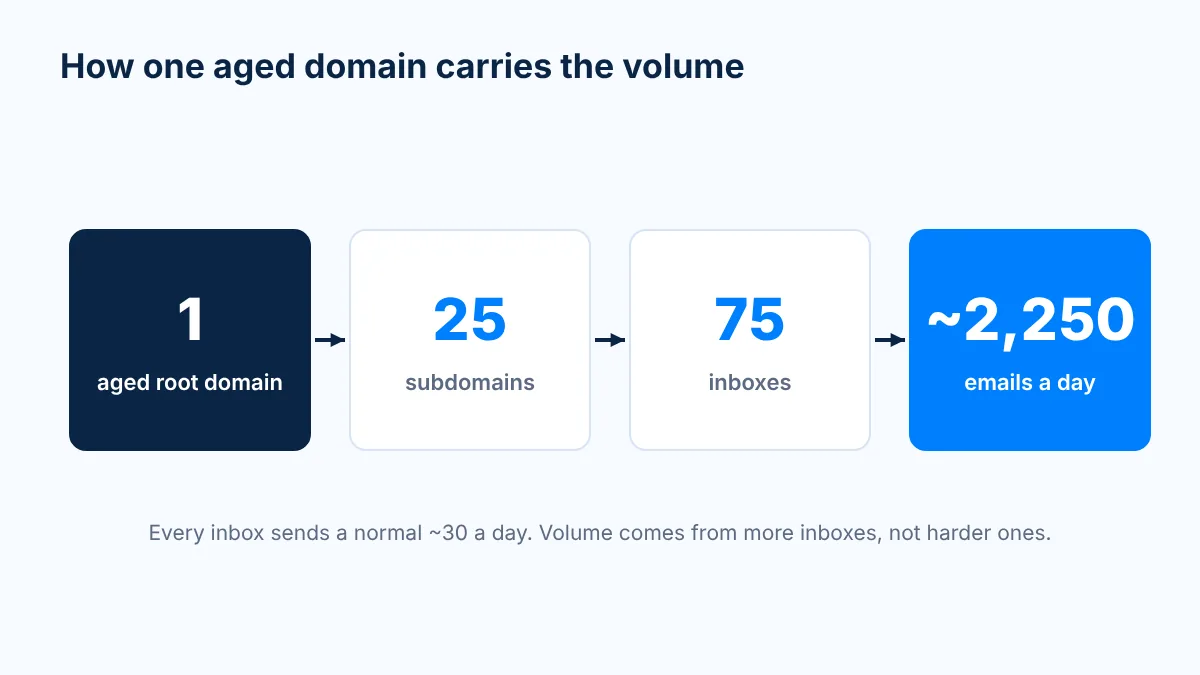
Yes, you can send cold email from subdomains, and done right it is the cleanest way to scale without burning through domains. The catch is the parent. Never send cold email from your brand's root domain, and put your sending subdomains on an aged domain (registered 10+ years ago, renewed every year, clean reputation) so every subdomain starts with real history. One aged domain with 25 subdomains and 3 inboxes each sends about 2.2K emails a day, with every inbox at a normal ~30 a day.
Last updated: November 2026
I've been deep in email deliverability since 2019, and I've sent my own cold email from subdomains for about three years. At Mission Inbox, subdomains are not a hack we bolted on later. They are the core of how the infrastructure is designed.
This guide puts everything in one place: what a subdomain is, why most of the market tells you to avoid them, where that advice is right, where it is wrong, the math, the setup, and what to do when one burns. Each section links to a dedicated guide if you want to go deeper.
What is a subdomain?
A subdomain is the word in front of a domain. try.acme.com is a subdomain of acme.com. So are get.acme.com and book.acme.com.
For cold email, three things make subdomains interesting:
It costs $0. A subdomain is a DNS record, not a purchase.
There is no renewal. It lives as long as the root domain does.
It inherits. A new subdomain starts with the root's history instead of starting from zero.
Each sending subdomain still needs its own mail records (MX, SPF, DKIM and DMARC), aligned so the name in the From line, the name that signs the email and the name allowed to send it all match.
None of this is new. Your receipts come from something like orders.yourshop.com, your bank's newsletter from news.yourbank.com, and your video calls from meet.google.com. Big companies have split email streams by subdomain for more than 20 years, and the industry's own best-practice body, M3AAWG, says in its Sending Domains Best Common Practices that "proper use of subdomains will help your sending program benefit from the organizational domain's existing reputation." Cold email is just one more stream.
Why does most cold email advice say "never use subdomains"?
Search "subdomain for cold email" and most of page one tells you the same thing: buy lookalike domains (getacme.com, tryacme.com), put 2 or 3 inboxes on each, and stay away from subdomains. The reason given is always the same. Subdomains share reputation with the parent, so a burned subdomain can drag the main domain down with it.
That concern is real. Inbox providers and blocklists do connect subdomains to their parent:
Google counts the 5,000-a-day bulk sender threshold for personal Gmail at the primary domain, so mail from every subdomain adds up to one number.
Domain blocklists like the Spamhaus DBL and SURBL work at the domain level, and a listing on the registered domain covers everything under it.
Where that advice is right
If the parent is your brand domain, the one your CEO, your support team and your invoices send from, the advice is correct. Do not send cold email from it, and do not hang high-volume cold subdomains off it unless it passes the checks further down this page. Your brand domain is the one thing you can't replace.
Where that advice is wrong
The advice treats inheritance only as a risk. Inheritance is also the whole reason subdomains work. A lookalike domain registered two weeks ago has nothing to inherit. It's a stranger with no history, and Microsoft in particular treats it like one.
So the real question was never "subdomain or separate domain." It's "what is the parent?" Put your subdomains on a separate aged domain that is not your brand, and you get both things the lookalike crowd wants: your brand domain is never touched, and every sending subdomain starts with a decade of trust behind it.
That's the model we built Mission Inbox around.
How does Mission Inbox run subdomains for cold email?
One aged, non-branded root domain. Up to 25 subdomains on it. Three inboxes on each subdomain. Every inbox sends a normal ~30 emails a day.
What
Number
Aged root domain
1 (registered 10+ years ago, renewed every year, clean)
Sending subdomains
Up to 25
Inboxes per subdomain
3
Total inboxes
75
Emails per inbox per day
~30
Daily capacity
~2,250 (about 2.2K)
Monthly capacity
~48K (22 sending days)
Pre-warmed root inboxes
5, sending ~150 a day from day one
We don't push any inbox harder than normal. The volume comes from more inboxes under one name that inbox providers already trust. We don't push, we multiply.
The 5 pre-warmed inboxes on the root are there so you aren't stuck waiting. They send about 150 a day from day one as a proof of concept while the subdomain inboxes warm up. On a leased aged domain that works because the root is a sending asset, not your brand.
Need more than ~2.2K a day? Add another aged domain instead of stacking more inboxes on the same one. 20 to 25 subdomains per domain is the sweet spot.
Everything is created the same day you sign up (subdomains, inboxes and DNS records) and pushed straight into your sequencer, whether that's Instantly, Smartlead or EmailBison. Your sequencer is the car. The infrastructure is the road.
Why do subdomains inherit the parent's reputation?
The way I explain it on calls: if I'm Zeus and I have a subdomain as a baby, let's call it Hercules, it's still a baby and I have to nurture it. But it has my genetics. Great genetics, plus a little training.
A brand-new lookalike domain is a baby with no parents at all. Send it to Sparta and it dies. That's why so many "my domains keep burning" stories aren't copy problems. The domains are babies, and they're being sent to war.
Age matters most with Microsoft. In our experience, Google mostly cares about two things: whether your copy looks spammy and whether your domain is on a blocklist. Microsoft plays the IP reputation game and the domain age game. It's looking for legitimacy. Outlook reads your domain's birth certificate before it reads your email.
Ask yourself which email you'd trust more: one from a domain registered two weeks ago, or one from a domain that has been renewed every year for over a decade? No spammer waits ten years to send their first cold email. They buy domains as fast as possible and start sending as fast as possible. Age is a signal you can't fake, and you can't warm up your way into it.
One more thing, said plainly: subdomains only multiply what the root already has. Zero history times 25 subdomains is still zero. History first, subdomains second.
Subdomains vs lookalike domains: what does the math look like?
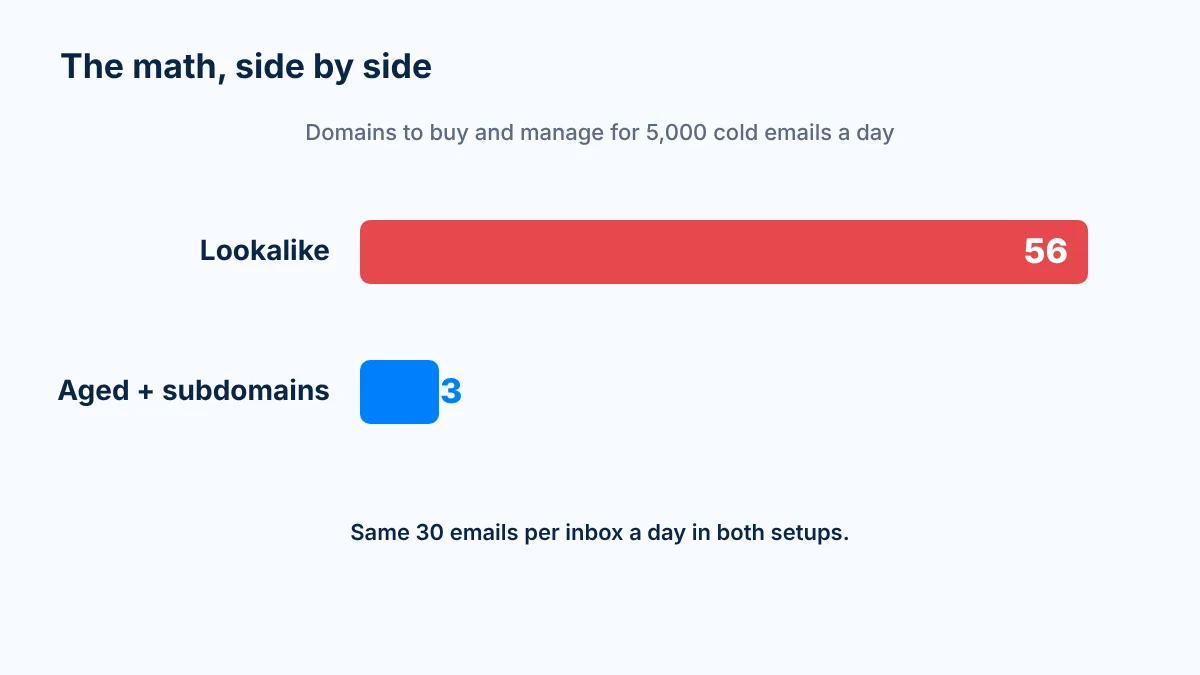
Take a team that wants to send 5,000 cold emails a day.
The usual way: 3 inboxes per lookalike domain at ~30 a day is 90 emails per domain. 5,000 divided by 90 is 56 domains, carrying 168 inboxes.
The aged way: 3 aged domains with 25 subdomains and 3 inboxes each give you 225 inboxes and about 6,750 a day of capacity. Same volume per inbox. 53 fewer domains.
Lookalike domains
Aged domains + subdomains
Domains needed for 5,000 a day
56
3
Inboxes
168
225
Emails per inbox per day
~30
~30
Domain history on day one
Weeks old
10+ years
Domains to renew every year
56
3
When one burns
Buy, set up and warm a new domain
Replace one DNS record
What your prospect sees
Dozens of slightly-off brand names
One established domain per sender group
The hidden cost isn't the domain fees. It's 56 renewals, 56 warm-ups, 56 sets of DNS records, and every burned domain being a campaign that stopped landing: replies you never got. That's not a sending setup. That's a part-time job.
The way I picture it: lookalike domains are little soldiers you buy, throw into battle and replace. Subdomains on an aged root are an army of isolated cubes that cost you nothing to add.
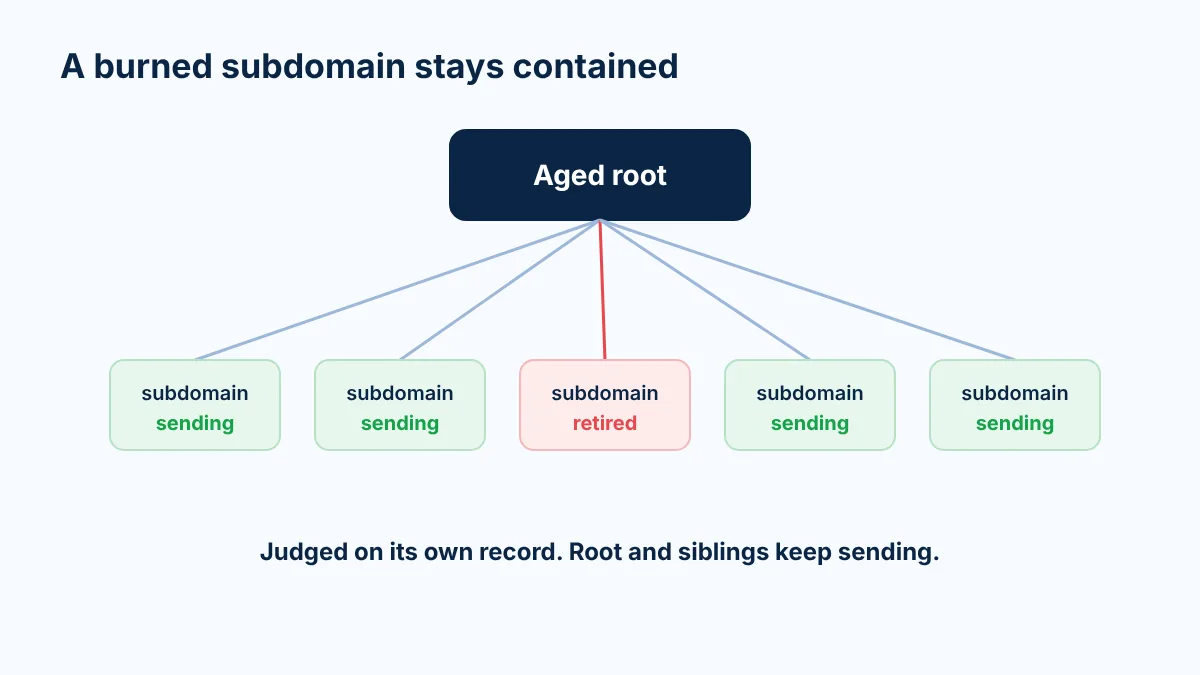
Reputation flows down, not up. Think of a water pipe. Water flows downwards, and subdomains don't go against the laws of physics. When one subdomain gets into trouble, inbox providers judge it largely on its own record. You retire it, and the root and the sibling subdomains keep sending.
We see this in placement data all the time. In one test on a single root domain, same IP, same copy, a few subdomains landed in spam at Microsoft on every inbox while their siblings landed in the inbox. Subdomains on the same root perform at different rates, both on reply rate and on placement tests. That's isolation working.
Now the honest caveat, because anyone who tells you isolation is absolute is selling you something. The one risk runs downhill. If the root itself gets blocklisted, every subdomain goes with it. Domain blocklists list the registered domain, and inbox providers count volume at the parent level. The protection only holds if the root is protected too.
That's why the rules are strict:
The root is aged, clean and never used for heavy cold sending.
Each inbox stays at ~30 a day, and each subdomain at 3 inboxes.
One campaign per subdomain (for agencies, one client per subdomain), so a bad list only burns its own subdomain.
Every subdomain is monitored on its own, and a burned one gets replaced fast instead of pushed harder.
And your brand domain stays out of all of it. That separation is the same idea behind isolated infrastructure: your sending never shares a fate with anyone else's.
What do you do when a subdomain burns?
With lookalike domains, a burn means buying, setting up and warming another domain. With subdomains, it's one DNS record. On a one-domain setup, a burn is a crisis. On subdomains, it's a Tuesday.
How to spot one:
Reply rate drops on one subdomain only, while its siblings run the same list and the same copy.
A placement test shows that subdomain landing in spam.
Bounces or blocks cluster on that subdomain's inboxes.
To see any of this, tag or group your inboxes by subdomain in your sequencer so you can read reply rate per subdomain, not just per campaign.
The fix, in 4 steps:
Stop sending from the burned subdomain.
Delete its DNS records.
Create a new subdomain. It costs $0 and is born with the root's reputation.
Warm it for 3 weeks, then ramp from 5 to 30 emails a day per inbox.
That's it. You don't nurse a burned subdomain back to health. You replace it and keep going.
How should you name and warm up sending subdomains?
Naming: boring is good. Use short, real words a team would actually use, like get, try, book, start, talk, reach, connect or team. Avoid random strings like x7k-mail or mail2, and avoid spammy words like cold, outreach, promo or offers.
Then placement-test every name. In the same test, subdomains named hub, join and meet got 0% inbox at Microsoft on every mailbox, across two senders created months apart, while other subdomains on the same root landed fine. The common factor was the subdomain name, not the person sending. Names matter more than people think.
Warm-up: genetics don't skip training. A new subdomain inbox gets 3 weeks of warm-up before its first cold email. Then start at 5 a day, add 5 a day until you reach 30, and keep warm-up running 1:1 alongside your outbound for as long as the inbox sends. In that test, every Microsoft spam placement came from inboxes with warm-up turned off.
Even on a 20-year-old root, a new subdomain inbox is still a baby. The root gives it a head start, not a free pass. More on warm-up in general in our complete guide to domain warming.
Should you put subdomains on your own domain or an aged domain?
There are two paths, and you can decide in about 10 seconds.
Path A: your own domain (or your client's)
Path B: an aged domain from Mission Inbox
When it fits
Years of outbound sending history AND a Spamhaus score above +3 AND the owner says yes
Everything else
Is the brand domain involved?
Yes, so the checks matter, and you never send cold from the root
No
Day one
Subdomain inboxes start warming
5 pre-warmed root inboxes send ~150 a day while subdomains warm
Capacity
Up to 25 subdomains x 3 inboxes
Up to 25 subdomains x 3 inboxes, ~2.2K a day per domain
Who can use it
You
Only you, for as long as you lease it
Path A, your own domain. "It exists" isn't enough. A ten-year-old domain that has only ever sent invoices hasn't proven anything to an inbox provider about outbound. It needs years of real sending history and a good reputation score.
Check it on Spamhaus domain reputation. Zero is average. Anything above +3 takes years to build. One domain I checked, registered in 2005, scored 13.8. That number is behavior plus age, and nobody warms up their way into it. More on reading those scores in our domain reputation guide.
Agencies with enterprise clients: ask the client first. If the answer is no, go with Path B.
Path B, an aged domain. Your brand isn't involved at all. The usual pushback is "but I want my brand in the URL." Quick test: name one company that cold emailed you last week. You can't, and neither can your prospects. People reply to the offer, not the URL. What the URL decides is whether they ever see the offer.
What results do teams get with subdomains?
These are our clients' numbers, not ours. Mission Inbox's job is making sure the emails land.
GTMx (Path A). A fintech team selling into buyers behind Barracuda, Microsoft and Google filters. They had tried several infrastructure providers first. With subdomains on their own strong primary domain, sending 2,000 to 4,000 emails a day, their reply rate went from under 0.5% to above 5%. Months later, no burned domains.
"When Tony asked me which email I'd trust more, one from a domain registered two weeks ago or one from a domain registered ten years ago, it immediately clicked for me." Joshua Solomon, Founder, GTMx
"Deliverability recovered almost immediately." Joshua Solomon, Founder, GTMx
Unit21 (Path A, regulated industry). In finance, sending from your real domain is expected. Unit21 runs enterprise outbound on subdomains of its own domain, with the primary domain untouched.
"Mission Inbox opened up a channel we hadn't really had before. It takes a lot of pressure off our reps." Nicholas Bennett, GTM Engineer, Unit21
A cold email agency with 10,000+ inboxes. Hundreds of subdomains, each isolated from the next, plus dedicated IPs and blocklist monitoring every 7 minutes. After 90 days: inbox placement above 90%, positive replies up more than 3x, and about $120K a month in added pipeline.
A B2B team that kept its copy. Same copy, same offer. With dedicated IPs and subdomain isolation, their reply rate went from 2% to 5.4%.
What I hear from almost every client who tests aged domains with subdomains: this is the infrastructure that has given them their best reply rate, and these are the domains they don't have to worry about burning.
We've been saying this since 2024
A lot of people in cold email are testing subdomains right now. Good. It's the right direction, and the more people run it properly, the better for everyone sending legit outbound.
We've run cold email on subdomains for about three years and have been writing about it in public since 2024. Here are the dated posts, so you can check for yourself.
The Jan 22, 2026 post is the one that says it most directly:
Why didn't the rest of the market do this earlier? Subdomains are an operational headache to build: DNS, authentication, inboxes and warm-up on every single one. And most providers make money selling you more domains. It's a business decision, not a technical limit. As far as we know, we were the first infrastructure provider to build around subdomains on aged roots as the core design rather than an add-on.
We sell aged domains at Mission Inbox, so yes, I have an incentive here too. Which is exactly why I'm not asking you to trust me. I'm asking you to test it.
FAQ
Is it safe to send cold email from a subdomain?
Yes, if the parent domain is not your brand domain or passes strict checks. Put sending subdomains on an aged, clean domain, keep each inbox around 30 emails a day, and never send cold email from the root itself.
Does a subdomain inherit the main domain's reputation?
Yes. A new subdomain starts with the root domain's history, which is why the root should be an aged domain registered 10+ years ago with a clean record. Each subdomain then builds its own record on top.
Can a burned subdomain hurt my main domain?
Reputation mostly flows down, not up, so a burned subdomain is usually retired without hurting its siblings. The exception is a blocklisting of the root itself, which covers every subdomain, so the root must stay clean and protected.
How many subdomains and inboxes should one domain have for cold email?
We recommend up to 25 subdomains per aged domain with 3 inboxes each, at about 30 emails per inbox per day. That is about 2.2K emails a day per domain. For more volume, add another aged domain.
How long should you warm up a new subdomain?
Warm new subdomain inboxes for 3 weeks before the first cold email, then start at 5 a day and add 5 a day up to 30. Keep warm-up running alongside outbound for as long as the inbox sends.
Should I use my company domain or an aged domain for cold email subdomains?
Use your own domain only if it has years of outbound sending history, a Spamhaus reputation score above +3, and the owner's approval. Otherwise use a separate aged domain so your brand domain is never involved.
Get the full playbook
Everything on this page, with every number, the naming list, the setup timeline and the burn playbook, is in The Subdomains on Aged Domains Playbook. It's free, and it's the same playbook we walk clients through on onboarding calls.
If you'd rather see it running on your own sending, talk to us and we'll map how many aged domains your daily volume actually needs.
Hopefully in your inbox, Tony
Share article
Read Time
14 MIN READ
Category
Infrastructure
Send with Protection
Stop relying on shared infrastructure that you don't control. Mission Inbox gives you dedicated servers, dedicated IPs, and full ownership of your sending reputation.
Does a subdomain inherit the main domain's reputation?
Can a burned subdomain hurt my main domain?
How many subdomains and inboxes should one domain have for cold email?
How long should you warm up a new subdomain?
Should I use my company domain or an aged domain for cold email subdomains?
Send at volume with Mission Inbox
Stop relying on shared infrastructure that you don't control. Mission Inbox gives you dedicated servers, dedicated IPs, and full ownership of your sending reputation.
Thank you! Your submission has been received!
Oops! Something went wrong while submitting the form.
Before you go
Get a free deliverability consulting call
Grab 30 minutes with our deliverability team. We'll audit your domains, mailboxes and sending volume live, and show you exactly where your placement is leaking. No pitch, no obligation, no card.
See how much pipeline shared infrastructure is making you lose
Spot burned domains and bad IP neighbors before they tank a campaign
See the campaign performance differences between Mission Inbox senders and other providers