A step-by-step setup for cold email subdomains: DNS records, naming, warm-up, ramp-up, and what to do when one burns.
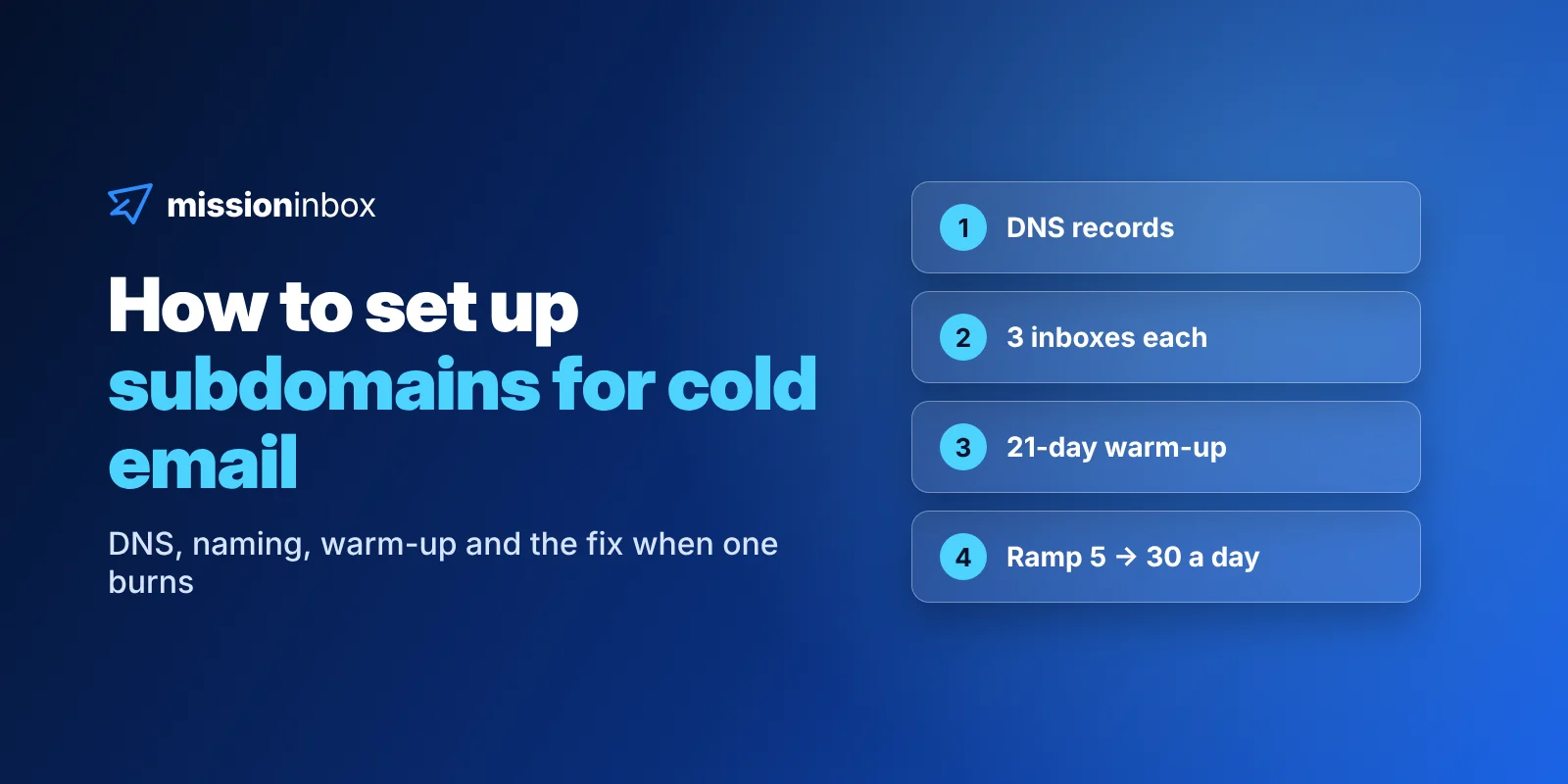
Setting up subdomains for cold email takes six steps: pick a safe root domain, create a subdomain with aligned MX, SPF, DKIM and DMARC records, put 3 inboxes on it, connect those inboxes to your sequencer tagged by subdomain, warm them for 3 weeks, then ramp from 5 to 30 emails a day per inbox. Name each subdomain like a real team would, run one campaign per subdomain, and watch reply rate per subdomain so you catch a burn early. When one burns, you replace a DNS record, not a domain.
Step 1: Which root domain should your subdomains live on?
Everything a subdomain has, it inherits from its root. The way I explain it on calls: if I'm Zeus and my subdomain is Hercules, Hercules is still a baby that needs nurturing, but he was born with great genetics. A brand-new domain is a baby with no parents at all.
So the first decision isn't the subdomain. It's the root. You have two paths.
Path A: your own (or your client's) domain. Only if both of these are true:
It has years of outbound sending history, not just years of existing.
Its Spamhaus domain reputation score is above +3. You can check it in 30 seconds at spamhaus.org/domain-reputation. Zero is average, and anything above +3 takes years to build.
Agencies, ask the client before you touch their domain. If they say no, go to Path B.
Path B: an aged domain that isn't your brand. Registered 10+ years ago, renewed every year since, clean reputation. Your brand domain is never at risk, and the subdomains still inherit a decade or more of history. We cover how to judge one in aged domains for cold email.
One rule applies to both paths: never send cold email from the root itself. The root is the parent. The subdomains do the sending.
Step 2: What DNS records does a cold email subdomain need?
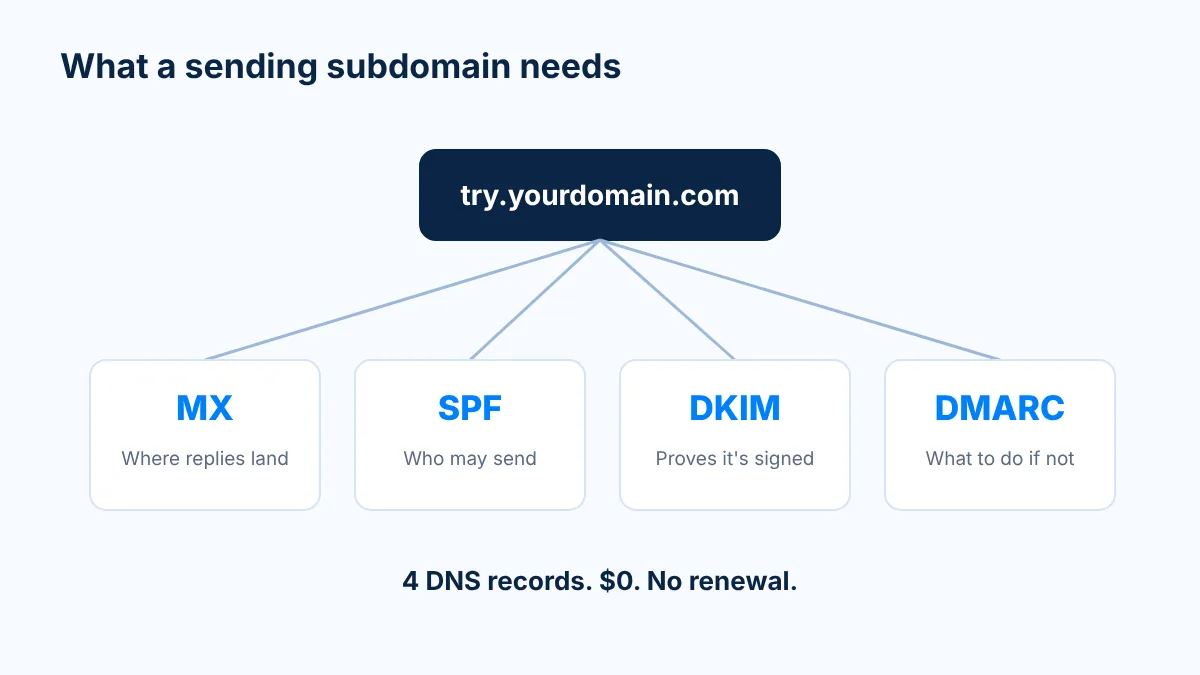
A subdomain is just a set of DNS records added to the root's "address book." It costs $0, it's not a purchase, and it never needs renewing. For a subdomain to send cold email and receive replies, it needs four records.
Record
Host (example)
Value (example, placeholder)
What it does
MX
try.yourdomain.com
10 mail.yoursendinghost.example
Tells the world where to deliver replies sent to the subdomain
SPF (TXT)
try.yourdomain.com
v=spf1 include:_spf.yoursendinghost.example ~all
The guest list of servers allowed to send as this name
DKIM (TXT)
selector1._domainkey.try.yourdomain.com
v=DKIM1; k=rsa; p=(public key from your mail host)
A signature on every email proving it wasn't faked or changed
DMARC (TXT)
_dmarc.try.yourdomain.com
v=DMARC1; p=none; rua=mailto:dmarc@yourdomain.com
The rulebook for anything that fails SPF or DKIM, plus reports
Your mail host gives you the exact MX, SPF include and DKIM key. Two things matter more than the exact values.
Alignment. The name in the From line, the name that signs the email (DKIM) and the name that's allowed to send (SPF) should all match the subdomain. That's what Gmail and Microsoft check first. A subdomain that sends as try.yourdomain.com but signs as some other domain looks like exactly what spam filters are built to catch.
DMARC on the subdomain. If you don't publish a DMARC record on the subdomain, receivers fall back to the root's policy (its sp= tag, or p= if there's no sp=). Publishing one per subdomain keeps things explicit. A common approach is to start at p=none with reporting on, then tighten once the reports come back clean.
Step 3: How many inboxes should each subdomain have?
Three. Each inbox sends about 30 cold emails a day, max.
That's it. We don't push inboxes harder to squeeze more out of a subdomain. We multiply instead. On an aged domain, up to 25 subdomains with 3 inboxes each gives you 75 inboxes, which is about 2.2K emails a day (roughly 48K a month) at a completely normal 30 per inbox. 20 to 25 subdomains is the sweet spot. Need more volume? Add another aged domain. Don't stack a fourth and fifth inbox onto one name.
Use real first names for the inboxes, the same way a real team would set up its people.
Step 4: Connect the inboxes to your sequencer and tag them by subdomain
Once the inboxes exist, connect them to your sequencer (Instantly, Smartlead, EmailBison or whatever you run). Then do the one thing most teams skip: tag or group every inbox by its subdomain.
Why it matters: your sequencer reports by campaign. A burn happens per subdomain. If you can't read reply rate, bounces and blocks per subdomain, you'll find out something broke when the whole campaign drops, which is about two weeks too late.
Step 5: How long should you warm up a new subdomain?
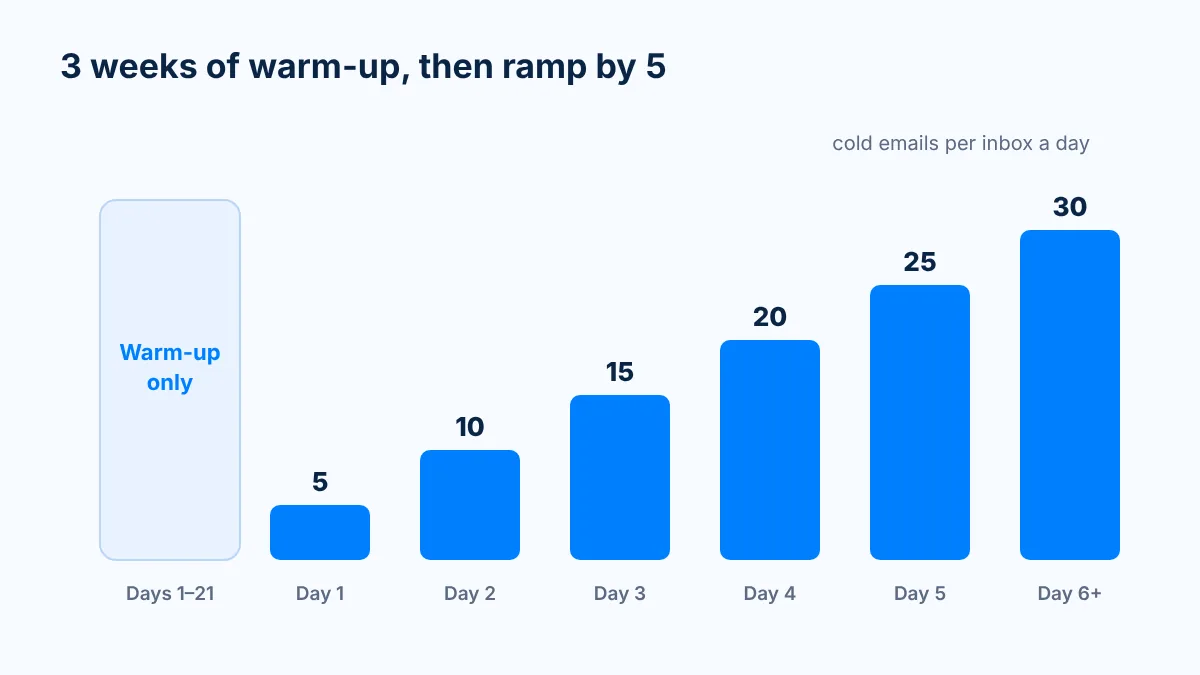
Three weeks (21 days) before the first cold email. Longer is better.
People push back on this. "If the subdomain inherits the root's reputation, why warm it?" Because inheriting good genetics doesn't mean you're ready for battle. The subdomain is new, its inboxes are new, and inbox providers want to see them behave normally before they carry cold volume. In my own words from the Zeus and Hercules post: great genetics, plus a little training.
After the 3 weeks, ramp each inbox slowly:
Phase
Cold emails per inbox a day
Whole aged domain a day (75 subdomain inboxes)
Days 1 to 21
0 (warm-up only)
0
Sending day 1
5
375
Sending day 2
10
750
Sending day 3
15
1,125
Sending day 4
20
1,500
Sending day 5
25
1,875
Sending day 6 onward
30
2,250
If you ramp slower than 5 a step, that's fine. Slower is safer.
Then the rule that keeps you alive long term: keep warm-up running 1:1 with outbound, forever. Don't turn it off once you're ramped. In one placement test we ran for a client, inboxes with warm-up on scored 100% inbox. Inboxes with warm-up off on the same setup scored 80%, and every Microsoft spam result in that test came from the warm-up-off group. Warm-up isn't only there to build reputation. It's there to offset the negative signals that cold email always brings.
The subdomain is the first thing your prospect sees in the From line. Name it like a real team would. Boring is good.
Do
Don't
Short, real words a team would use: get, try, book, start, talk, reach, connect, team, people, success
Random strings like x7k-mail, mail2 or out-01
Keep it readable as part of a normal sender address (talk.yourdomain.com)
Spammy words like cold, outreach, promo or offers
Placement-test every name before you scale it
Assume a name is fine because it looks fine
Retire any name that tests badly and move on
Keep sending from a name that lands in spam "to see if it recovers"
That last row comes from real data. In one placement test we ran on a single root, with the same IP and the same copy, inboxes on the subdomains hub, join and meet got 0% inbox at Microsoft, on every inbox, while their sibling subdomains landed fine. It happened across two senders whose inboxes were created months apart, which points at the name, not the person. Names matter, so test them.
One campaign (or one client) per subdomain
Treat every subdomain like its own rail in a train station. One campaign rides on each rail, so a bad list or a bad piece of copy derails only its own rail, and your reply-rate data tells you exactly which campaign caused it.
Sales teams: one subdomain per campaign, persona or segment. A VP Sales campaign on talk., a RevOps campaign on reach.
Teams with several reps: a rep can own a subdomain, so their results are easy to read.
Agencies: one client per subdomain, or one client per aged domain for bigger clients. Never mix two clients' lists on the same subdomain.
How do you monitor subdomains so you catch a burn early?
Burns happen to every sender. The goal is to see one on a single subdomain before it shows up in your pipeline. Three signals:
Reply rate drops on one subdomain only. Same list, same copy as its siblings, but its replies fall while theirs hold. That's the earliest and most reliable warning, and it's why Step 4 (tagging) matters.
Placement tests show that subdomain in spam. Test every subdomain before you scale it, and again whenever something looks off.
Bounces or blocks cluster on its inboxes. If the errors keep landing on the same 3 inboxes, it's the subdomain, not the list.
Read reply rate, not vanity metrics. Replies are the only number that tells you a real person saw the email.
What do you do when a subdomain burns?
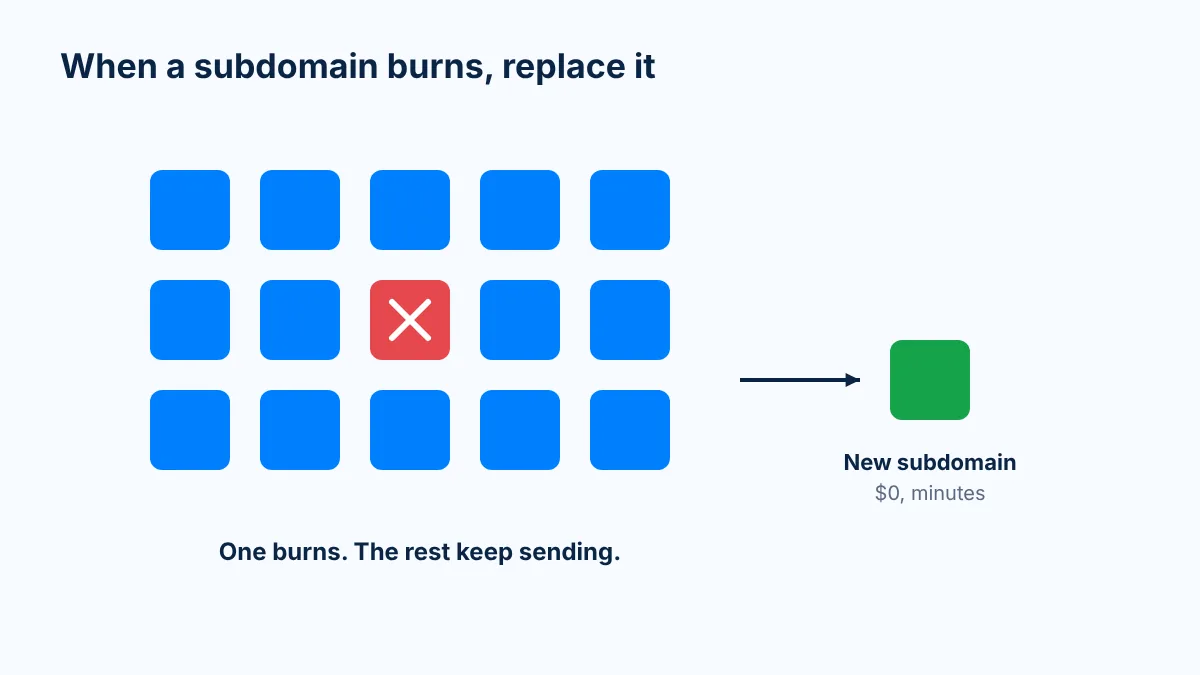
Don't panic. This is the whole point of the setup. On a one-domain setup, a burn is a crisis. On subdomains, it's a Tuesday.
Stop sending from it. Pull its inboxes from every campaign.
Delete its DNS records. The subdomain stops existing.
Create a new subdomain. It's born with the root's reputation, and it costs $0.
Warm it up, then send. 3 weeks, then ramp from 5 to 30 a day.
Lookalike domains burn and you buy more. Subdomains burn and you replace one DNS record, while the aged root keeps its history. Reputation flows down, like water in a pipe, not back up.
One honest caveat: the one risk that runs downhill is the root itself. If the root gets blocklisted, every subdomain goes with it, because domain blocklists list the registered domain. That's why the root must be aged and clean, why it never sends cold email itself, and why every inbox stays at a normal 30 a day. The full explanation is in how subdomain reputation works.
How Mission Inbox sets this up for you
Doing all of the above by hand is a lot: DNS, authentication, inboxes and warm-up on every single subdomain. That's why most providers don't offer it. When we looked at how our clients were burning through dozens of lookalike domains, we built Mission Inbox around subdomains instead.
Here's what it looks like for a customer:
Pick an aged domain in Mission Inbox (10+ years old, clean) or bring a root that passes the Path A rules, and check its Spamhaus score.
Same day, the subdomains, inboxes and DNS records are created for you. MX, SPF, DKIM and DMARC are set automatically and aligned on every subdomain.
The root inboxes on our aged domains come pre-warmed, so you can send about 150 a day on day one as your proof of concept while the subdomains warm for 3 weeks.
When a subdomain burns, you replace it, and the rest of the setup never notices. Each customer's sending sits on its own isolated infrastructure, which you can read about on The Cubes.
Our advice is always the same: don't move everything. Run one aged domain next to your current setup, with the same copy and the same list, and let your reply rate decide.
FAQ
How many inboxes should each cold email subdomain have?
Three inboxes per subdomain, each sending about 30 cold emails a day at most. If you need more volume, add another aged domain instead of stacking more inboxes on one subdomain.
How long should I warm up a new subdomain before sending cold email?
Three weeks (21 days) of warm-up before the first cold email, even though the subdomain inherits its root's reputation. Then start at 5 a day per inbox and add 5 a day until you reach 30, and keep warm-up running 1:1 with outbound.
How many subdomains can I create on one domain?
DNS lets you create far more than you need. For cold email we recommend up to 25 subdomains per aged domain, with 20 to 25 as the sweet spot. Past that, add another aged domain.
What DNS records does a cold email subdomain need?
An MX record so replies can arrive, an SPF record listing who can send, a DKIM record that signs every email, and a DMARC record. SPF and DKIM should align with the subdomain in your From address.
What should I name my sending subdomains?
Short, real words a team would use, like get, try, book, talk or reach. Avoid random strings and spammy words like cold, outreach or promo, and placement-test every name before you scale it.
What do I do when a cold email subdomain burns?
Stop sending from it, delete its DNS records, create a new subdomain on the same root, then warm it for 3 weeks and ramp from 5 to 30 a day. The root and the other subdomains keep sending.
Stop relying on shared infrastructure that you don't control. Mission Inbox gives you dedicated servers, dedicated IPs, and full ownership of your sending reputation.
How many inboxes should each cold email subdomain have?
How long should I warm up a new subdomain before sending cold email?
How many subdomains can I create on one domain?
What DNS records does a cold email subdomain need?
What should I name my sending subdomains?
What do I do when a cold email subdomain burns?
Send at volume with Mission Inbox
Stop relying on shared infrastructure that you don't control. Mission Inbox gives you dedicated servers, dedicated IPs, and full ownership of your sending reputation.
Thank you! Your submission has been received!
Oops! Something went wrong while submitting the form.
Before you go
Get a free deliverability consulting call
Grab 30 minutes with our deliverability team. We'll audit your domains, mailboxes and sending volume live, and show you exactly where your placement is leaking. No pitch, no obligation, no card.
See how much pipeline shared infrastructure is making you lose
Spot burned domains and bad IP neighbors before they tank a campaign
See the campaign performance differences between Mission Inbox senders and other providers